If you’re evaluating SAP Business One or already running it, you’re likely asking a practical question:
Where is this platform going?
Not just the next feature release.
Not just incremental updates.
But the direction behind them.
For manufacturers and distributors, ERP is not a short-term decision.
It’s the system that ties together financials, inventory, production, and reporting.
Once it’s in place, it becomes part of how the business operates every day.
And that’s where uncertainty creates risk.
In real-world deployments, a common issue companies face is not choosing the wrong ERP, but choosing one that doesn’t evolve in step with their operations.
As the business grows, that gap shows up in very practical ways:
- Reporting takes longer and requires more manual work
- Integrations become harder to maintain
- Inventory and production data lose alignment with financials
- Teams start working around the system instead of within it
At that point, the problem is no longer the software itself.
It’s the mismatch between where the business is going and where the system is headed.
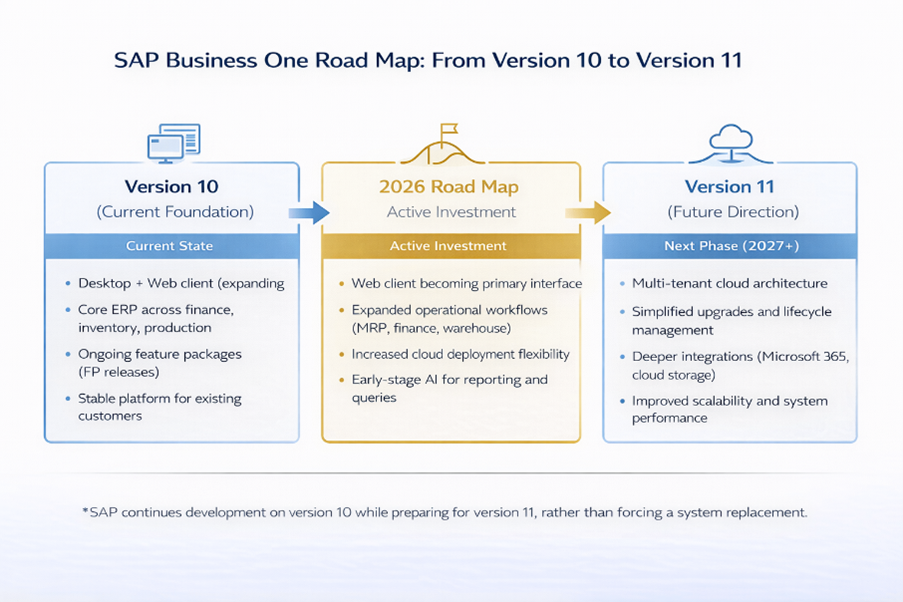
SAP’s Business One Road Map for 2026 provides clarity on that direction.

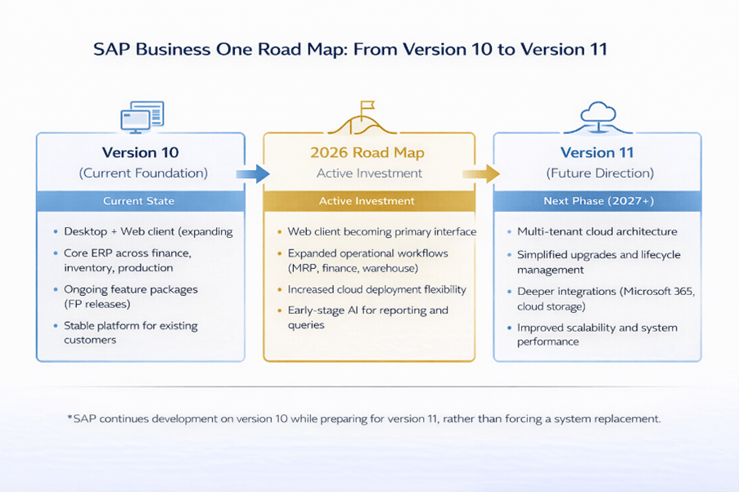
It reflects how SAP continues to invest in SAP Business One as its ERP platform for small- and midsize businesses, particularly manufacturers and distributors, while modernizing the system through web-based access, cloud flexibility, and early-stage AI capabilities.
What Is the SAP Business One Road Map 2026?
The SAP Business One Road Map 2026 defines how SAP is evolving its ERP software for small and midsize businesses, especially manufacturers and distributors, through ongoing updates to version 10 and a longer-term transition toward version 11.
Instead of replacing the system, SAP is continuing to build on SAP Business One while improving how it is accessed, extended, and maintained over time.
- Continued development of SAP Business One version 10 through feature packages
- Expansion of the browser-based web client for daily operations
- Ongoing investment in cloud and flexible deployment options
- Foundation for version 11 and future cloud architecture
This matters because ERP decisions are rarely about what the system does today.
They are about:
- Whether your system will support additional locations, products, and complexity
- How easily can your team adapt processes as operations evolve
- Whether your ERP platform will scale or require replacement in a few years
In most implementations, the cost of ERP is not the software.
It’s the disruption of having to change systems again.
In this guide, we’ll break down the SAP Business One Road Map 2026 in practical terms:
- What SAP is prioritizing
- What changes are coming in the near term
- How version 11 fits into the long-term strategy
- And what it means for manufacturers and distributors evaluating ERP
Because the goal is not to understand the roadmap.
It’s to understand whether SAP Business One will continue to support how your business needs to operate and grow.
Where SAP Is Investing (and Why It Matters)
Rather than looking at the roadmap as a list of features, it’s more useful to understand what SAP is improving operationally and how that impacts your business.
1. Web Client and Day-to-Day Usability
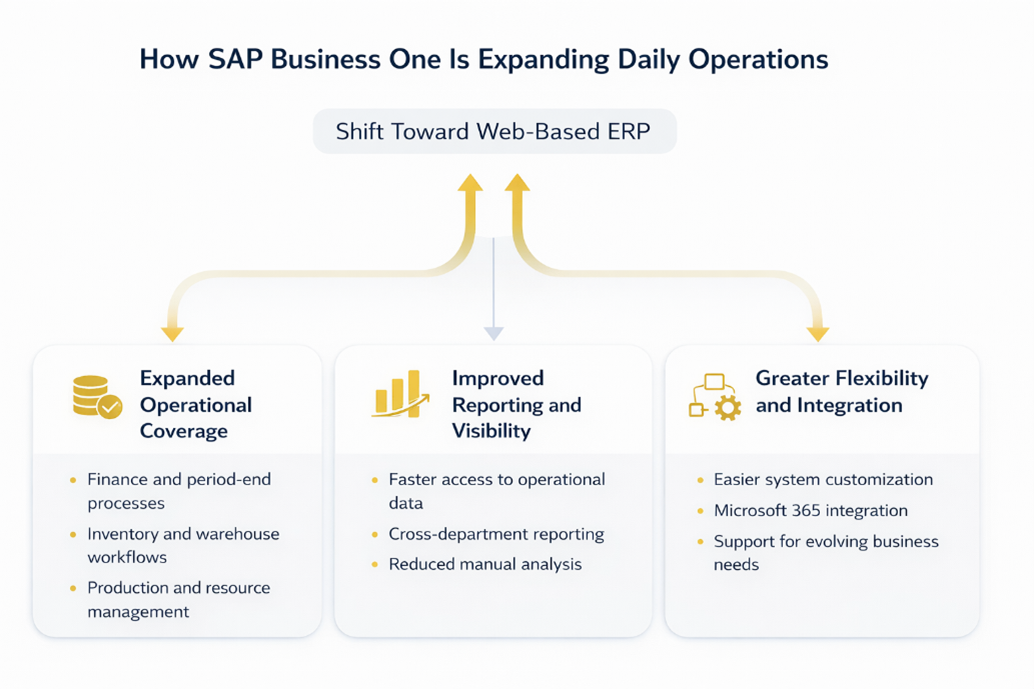
SAP is continuing to expand the SAP Business One web client, shifting more day-to-day activity into a browser-based experience.
This is not just a user interface change.
It affects how teams interact with the system.
In practice, this means:
- Less reliance on locally installed desktop clients
- Easier access across locations and devices
- Fewer barriers for non-technical users
For manufacturers and distributors, that typically shows up as:
- Improved access for warehouse and shop floor users
- Better support for multi-location operations
- Faster onboarding for new employees
In most implementations, the desktop client still plays a role.
But operational usage is clearly moving toward the web.
2. Cloud Strategy That Reflects Operational Reality
SAP is expanding cloud capabilities but not forcing a cloud-only model.
That’s intentional.
In real-world deployments:
- Some companies are ready for full cloud adoption
- Others require on-premises or hybrid environments
- Many operate somewhere in between
SAP Business One continues to support all three.
For manufacturers in particular, this flexibility is critical.
Production systems, integrations, and internal IT policies don’t always align with a SaaS-only approach.
The roadmap reflects that reality instead of forcing a single path.
3. Extensibility Without Heavy Customization
SAP is investing in its partner ecosystem and development framework to make SAP Business One easier to extend.
The goal is not more customization.
It’s more controlled extensibility.
In most ERP environments, heavy customization creates long-term challenges:
- Upgrades become more complex
- Integrations become fragile
- Maintenance effort increases over time
A stronger extension model helps reduce those risks by allowing businesses to:
- Add functionality without modifying core processes
- Keep systems current with less disruption
- Adapt more easily as requirements change
For growing SMBs, this is one of the most important long-term factors.
4. AI as a Practical Enhancement, Not a Replacement
SAP is introducing AI capabilities into SAP Business One, but the focus is practical.
Early use cases include:
- Helping users generate reports and queries
- Making data easier to access and interpret
- Supporting faster, more informed decision-making
In most implementations, AI is not replacing workflows.
It is improving how users interact with data.
The roadmap signals a gradual shift toward AI-assisted ERP, where:
- Reporting becomes less manual
- Insights are easier to generate
- Decision-making becomes more data-driven
What This Means for Manufacturers and Distributors
The roadmap is not about adding more features.
It’s about improving how the system supports daily operations.
For most manufacturers and distributors, that translates into:
- More accessible systems across teams and locations
- Fewer disruptions from upgrades and changes
- Greater flexibility in deployment and integration
- A clearer path to scale without replacing the ERP
In most implementations, that kind of controlled evolution is more valuable than rapid change.
Because ERP success is not determined by how quickly the software evolves.
It’s determined by whether the system continues to support how your business actually operates over time.
How the SAP Business One Web Client Is Changing Daily Operations
One of the most important shifts in the SAP Business One Road Map 2026 is the continued expansion of the web client.
This is not just a technical upgrade.
It changes how teams interact with the ERP system on a daily basis.
Traditionally, SAP Business One has relied on a desktop client.
That model works, but it creates limitations as operations grow:
- Users need local installations
- Remote access often requires additional setup
- Expanding access across locations adds complexity
The web client addresses those constraints by moving core ERP functionality into the browser.
What the Web Client Actually Does
The SAP Business One web client provides access to core business processes through a browser while using the same underlying system and data.
This includes areas such as:
- Sales and purchasing
- Inventory and warehouse management
- Financial transactions and approvals
- Reporting and dashboards
It is not a separate system.
It is a different way of accessing the same ERP platform.
If you’re not familiar with how SAP Business One manages these processes overall, it helps to understand how SAP Business One works.
What’s Changing in 2026
SAP is continuing to expand its web client to cover more operational workflows.
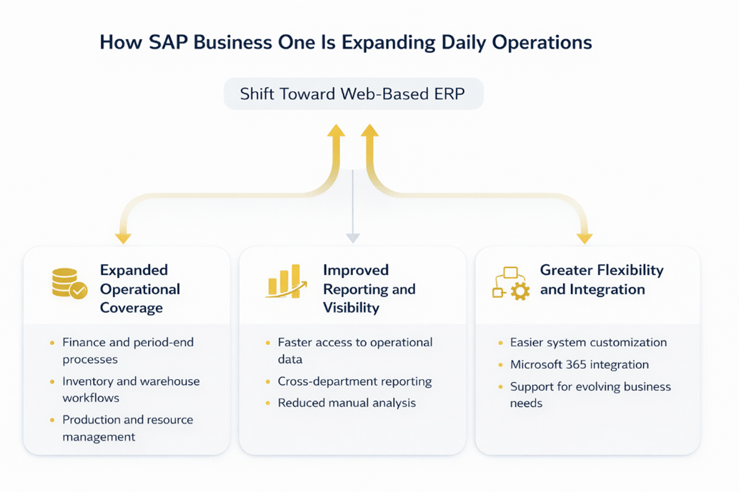
That includes:
- Broader support for finance and period-end processes
- Expanded warehouse and inventory functionality
- Improved reporting and analytics capabilities
- Greater extensibility through modern development tools
In most implementations, the web client is not yet a complete replacement for the desktop client.
But the direction is clear: more day-to-day work is moving into the browser.
What This Means in Practice
For manufacturers and distributors, this shift is less about technology and more about accessibility.
In real-world operations, ERP friction often shows up at the edges:
- Warehouse teams without easy system access
- Remote users relying on workarounds
- Delays in updating or retrieving information
The web client helps reduce that friction.
In practice, companies typically see:
- Easier access across warehouses and locations
- Faster user adoption with a simpler interface
- Reduced dependency on IT for setup and maintenance
- More consistent data entry across teams
For example, a warehouse supervisor can review inventory or process transactions without needing a full desktop setup.
A remote manager can approve documents or review reports from a browser.
Those are small changes individually.
But across operations, they reduce delays and improve consistency.
Where the Web Client Still Falls Short (Important Reality Check)
The web client is improving, but it is not complete.
In most implementations today:
- Some advanced functions still require the desktop client
- Certain configurations and administrative tasks remain desktop-based
- Not all workflows are fully replicated in the browser
This is important to understand.
The roadmap is moving toward a web-first experience, but it is happening gradually.
Companies should plan for a hybrid usage model in the near term:
- Web client for daily operations
- Desktop client for advanced tasks
Why This Shift Matters Long Term
The move toward a web-based ERP experience is not just about convenience.
It enables:
- Easier scaling across locations and users
- Lower dependency on specific devices or environments
- Faster rollout of updates and improvements
- Better alignment with modern cloud and integration strategies
For growing manufacturers and distributors, this becomes increasingly important as operations expand.
Because ERP challenges are rarely about what the system can do.
They are about how easily people can access and use it consistently across the business.
Cloud vs On-Premises: Where SAP Business One Is Heading
One of the most common questions companies ask when reviewing the SAP Business One roadmap is:
Is SAP moving everything to the cloud?
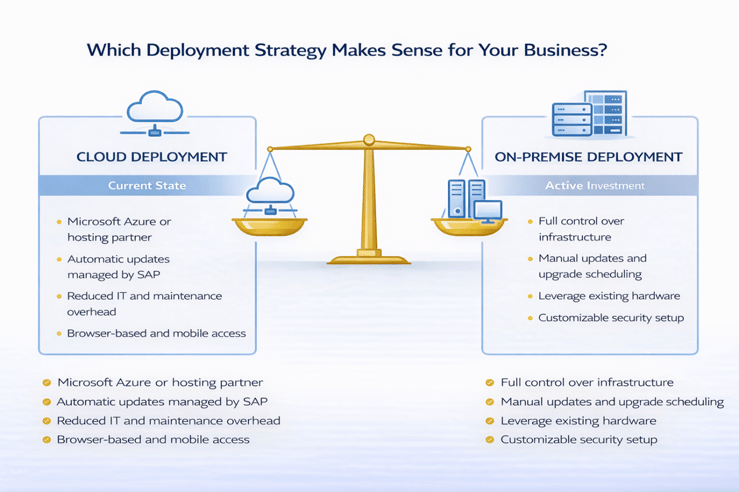
The short answer is no.
SAP is clearly investing in cloud capabilities, but it is not forcing a cloud-only model for SAP Business One.
What the SAP Business One Road Map Actually Shows
The SAP Business One Road Map 2026 reflects a cloud-first but not cloud-only strategy.
That distinction is important.
SAP is expanding:
- Support for cloud infrastructure (including hyperscalers)
- Browser-based access through the web client
- Integration capabilities with cloud services
At the same time, SAP continues to support:
- On-premises deployments
- Hybrid environments
This is not a forced transition.
It’s a gradual shift toward more flexible deployment options.
Why This Matters for Manufacturers and Distributors
In many ERP discussions, cloud is presented as a universal solution.
In practice, it’s more nuanced.
In real-world deployments:
- Some companies benefit from full cloud environments
- Others rely on on-premises systems due to production requirements
- Many operate in hybrid models, combining both
For manufacturers and distributors, factors like these often drive the decision:
- Shop floor systems and equipment integrations
- Latency and real-time processing requirements
- Internal IT policies and security constraints
- Existing infrastructure investments
Because of this, a one-size-fits-all cloud approach rarely works.
The SAP Business One roadmap reflects that reality.
What’s Changing (and What Isn’t)
What’s changing:
- Greater flexibility in where and how the system is deployed
- Improved access through web-based interfaces
- Stronger integration with cloud-based tools and services
What’s not changing:
- The ability to run SAP Business One on-premises
- Support for hybrid deployment models
- The underlying ERP functionality
This is not a shift away from existing customers.
It’s an expansion of options.
Decision Framework: Cloud vs On-Premises
For companies evaluating SAP Business One, the decision is not about following the roadmap.
It’s about aligning deployment with how your business operates.
Cloud may be a good fit if:
- You want to reduce internal IT infrastructure
- Your teams are distributed across locations
- You prioritize accessibility and scalability
- Your integrations are cloud-compatible
On-premises or hybrid may be a better fit if:
- You rely heavily on shop floor or equipment integrations
- You require tight control over infrastructure
- You have latency-sensitive operations
- You already have established IT systems in place
In most implementations, the right answer is not one or the other.
It’s choosing the model that aligns with your operational requirements, not just technology trends.
Where This Is Going Next (Version 11 and Beyond)
Looking ahead, SAP is moving toward a more cloud-ready architecture with version 11.
This includes:
- Multi-tenant capabilities
- Improved lifecycle management
- Easier system updates and scalability
But even with these changes, SAP’s approach remains consistent:
Expand flexibility, not restrict it.
What This Means for Your ERP Strategy
The takeaway is straightforward:
SAP Business One is evolving toward the cloud, but on practical terms.
For manufacturers and distributors, that reduces risk.
It allows you to:
- Adopt cloud capabilities where they make sense
- Maintain existing infrastructure where needed
- Transition over time instead of all at once
In most ERP decisions, deployment is not just a technical choice.
It’s an operational one.
And the roadmap supports making that decision based on your business, not vendor pressure.
What’s Next: SAP Business One Version 11 and Future Direction
While the SAP Business One Road Map 2026 focuses on ongoing improvements to version 10, it also points toward a larger shift already in progress:
The transition to version 11.
This is not a sudden replacement.
It’s a gradual evolution of the platform’s architecture.
What SAP Business One Version 11 Is Expected to Introduce
SAP has positioned version 11 as the next phase of Business One, not a new system, but a more modern foundation.
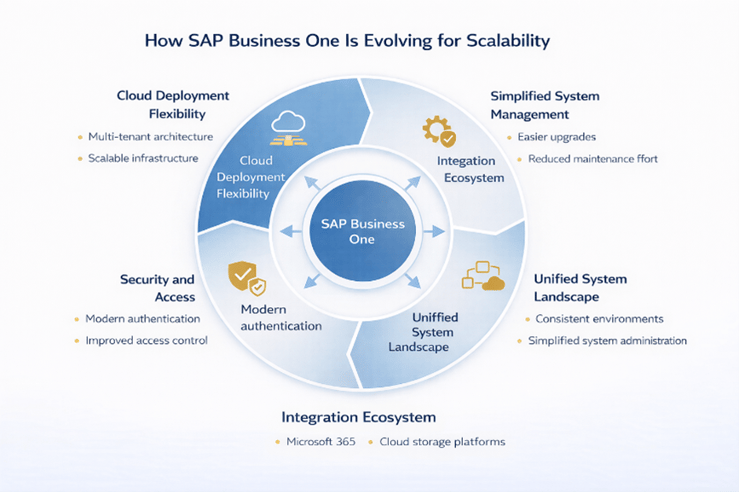
Key areas of focus include:
- Multi-tenant cloud capabilities for greater scalability
- Improved lifecycle management (simpler updates and upgrades)
- Enhanced security, including modern authentication methods
- Better integration with cloud storage and external platforms
These changes are designed to make the system easier to deploy, manage, and scale over time.
What This Actually Means for Your Business
For most manufacturers and distributors, version 11 is less about new functionality and more about how the system is delivered and maintained.
In real-world terms, that typically translates into:
- Less disruption during upgrades
- Easier expansion across locations or business units
- Reduced dependency on manual system maintenance
- More flexibility in how infrastructure is managed
This is especially important for growing companies.
Because as operations scale, system complexity tends to increase:
- More users
- More integrations
- More data
- More reporting requirements
Version 11 is intended to reduce that complexity, not add to it.
Important Reality Check: This Is a Transition, Not a Reset
It’s important to understand what version 11 is and what it is not.
It is:
- An architectural evolution
- A step toward more cloud-ready ERP
- A way to simplify long-term system management
It is not:
- A complete replacement of SAP Business One
- A forced migration for existing customers
- A fundamentally different ERP system
In most implementations, companies will not “jump” to version 11 overnight.
They will move toward it over time, based on:
- infrastructure strategy
- operational needs
- and timing of upgrades
How SAP Is Bridging Version 10 and Version 11
SAP’s approach is deliberate.
Instead of creating a hard break between versions, SAP is:
- Continuing to invest in version 10 through feature packages
- Expanding capabilities that align with future architecture
- Encouraging adoption of web client and modern extensions
- Building compatibility with future deployment models
This reduces risk for current customers.
It allows companies to adopt changes gradually without needing to reimplement the system.
Decision Framework: How to Think About Version 11
For companies evaluating SAP Business One today, the key question is not:
“When should we move to version 11?”
It’s:
“Are we aligning with the direction SAP is taking?”
You are aligned if:
- You are adopting the web client for daily operations
- You are minimizing heavy customizations
- You are planning for flexible (cloud or hybrid) deployment
- You are using standard processes where possible
You may face challenges later if:
- Your system relies heavily on custom modifications
- Your deployment strategy is rigid or outdated
- Your integrations are tightly coupled to legacy infrastructure
In most cases, alignment matters more than timing.
What This Means for Long-Term ERP Planning
The roadmap makes one thing clear:
SAP Business One is not standing still.
It is evolving in a way that prioritizes:
- stability
- flexibility
- and long-term scalability
For manufacturers and distributors, that reduces one of the biggest ERP risks:
Having to replace your system as the business grows.
Because the real cost of ERP is not implementation.
It’s reimplementation.
Is SAP Business One the Right Fit for Your Business?
By this point, the roadmap should be clearer.
SAP Business One is evolving, but not in a way that forces disruption.
It is being modernized gradually, with a focus on usability, flexibility, and long-term scalability.
The more important question is:
Does that direction align with how your business operates and plans to grow?
When SAP Business One Is a Strong Fit
SAP Business One is typically a strong fit for small to midsize manufacturers and distributors that have outgrown entry-level systems but are not ready for enterprise-scale ERP complexity.
In most implementations, it works well when companies are dealing with:
- Disconnected systems across accounting, inventory, and operations
- Limited visibility into inventory, costing, and profitability
- Manual processes for reporting and reconciliation
- Growth in SKUs, locations, or transaction volume
At this stage, the issue is usually not lack of effort.
It’s lack of system alignment.
SAP Business One addresses that by bringing:
- Financials
- Inventory
- Purchasing
- Production
- Reporting
into a single system.
This is where it becomes more than software.
It becomes an operational foundation.
When It May Not Be the Right Fit
SAP Business One is not the right solution in every case.
It may be less suitable if:
- You operate at a large enterprise scale with highly complex global requirements
- You require deeply specialized industry functionality beyond standard ERP capabilities
- Your strategy requires a fully SaaS-only environment with no infrastructure flexibility
- Your organization depends heavily on highly customized, non-standard workflows
In these cases, companies often evaluate alternatives such as:
- NetSuite
- SAP S/4HANA
- Industry-specific ERP platforms
ERP selection should reflect operational reality, not software preference.
Common Mistakes Companies Make
In real-world ERP evaluations, the biggest issues are not technical.
They are strategic.
Common mistakes include:
- Focusing on features instead of business processes
- Underestimating implementation complexity
- Over-customizing early instead of using standard functionality
- Choosing deployment models based on trends rather than requirements
- Not planning for how the system will scale over time
These issues often create more long-term problems than the software itself.
Decision Framework: How to Evaluate SAP Business One
If you’re evaluating SAP Business One, the decision should come down to alignment.
It’s likely a good fit if:
- You need better visibility across financials, inventory, and operations
- You are outgrowing accounting software or disconnected systems
- You want flexibility in deployment (cloud, on-premise, or hybrid)
- You are planning for growth in products, locations, or complexity
You may want to look deeper or consider alternatives if:
- Your requirements exceed the typical SMB ERP scope
- You need highly specialized functionality out of the box
- Your IT strategy requires strict SaaS standardization
- Your processes rely heavily on custom-built systems
In most cases, the right decision is not about choosing the “best ERP.”
It’s about choosing the ERP that best fits how your business operates.
What This Means Moving Forward
The SAP Business One Road Map 2026 reinforces one key point:
This is a platform designed to evolve with growing businesses, not be replaced by them.
For manufacturers and distributors, that matters.
Because ERP decisions are not one-time decisions.
They shape how the business operates for years.
And the cost of getting it wrong is not just implementation.
It’s having to do it again.
Next Steps: Evaluating SAP Business One for Your Business
By now, the SAP Business One Road Map 2026 should be clearer.
The platform is evolving in a deliberate way:
- Expanding usability through the web client
- Supporting flexible deployment models
- Preparing for a more scalable architecture with version 11
But the roadmap alone does not determine whether SAP Business One is the right fit.
That depends on your business.
Start With Operational Clarity, Not Software
In most ERP evaluations, the biggest challenge is not choosing between systems.
It’s understanding your own requirements clearly enough to make the right decision.
Before comparing platforms, it helps to define:
- How your financials, inventory, and operations currently interact
- Where visibility is limited or delayed
- Which processes rely on manual workarounds
- How your business is expected to grow over the next 3–5 years
Without that clarity, even the right system can be implemented the wrong way.
What a Structured Evaluation Should Include
A practical ERP evaluation typically involves:
- Reviewing current workflows across finance, operations, and inventory
- Identifying gaps in reporting, planning, and system integration
- Evaluating deployment strategy (cloud, on-premises, or hybrid)
- Understanding integration needs (EDI, shipping, shop floor systems)
- Mapping future requirements based on growth plans
If you need a structured approach, this is where an ERP selection framework becomes useful.
Where SAP Business One Fits into That Process
SAP Business One is one option within that evaluation, not the starting point.
It tends to align well when companies need:
- Strong integration between financials and operations
- Better inventory and production visibility
- A system that can scale without frequent replacement
- Flexibility in how the system is deployed and extended
If your requirements align with those needs, SAP Business One becomes a strong candidate.
If they don’t, another platform may be a better fit.
Final Perspective
ERP is not just a software decision.
It’s an operational one.
The right system should:
- Support how your business runs today
- Adapt as your operations grow
- Provide visibility into performance and profitability
- Reduce complexity, not introduce more of it
The SAP Business One Road Map 2026 reinforces that the platform is moving in that direction.
The question is whether that direction aligns with yours.
Frequently Asked Questions
Is SAP Business One still being developed?
Yes. SAP continues to invest in SAP Business One as its ERP platform for small and midsize businesses. The 2026 roadmap confirms ongoing development through version 10 feature updates while preparing for version 11.
In practice, this means companies can continue using the system with confidence while benefiting from incremental improvements rather than disruptive changes.
Will SAP Business One become cloud-only?
No. SAP is expanding cloud capabilities, but SAP Business One still supports cloud, on-premises, and hybrid deployments.
In real-world deployments, this flexibility matters. Many manufacturers and distributors rely on a mix of systems, so the ability to choose the right deployment model based on operational needs, not vendor direction, is a key advantage.
What is SAP Business One version 11?
SAP Business One version 11 is the next phase of the platform, expected to introduce improved cloud architecture, simplified system management, and enhanced scalability.
It is an evolution of the current system, not a full replacement, focused more on how the system is delivered and maintained than on changing core functionality.
Is the SAP Business One web client replacing the desktop client?
Not completely. The web client is becoming the primary interface for daily operations, but many implementations still rely on the desktop client for advanced tasks and configuration.
In most implementations today, companies use both the web client for accessibility and day-to-day work, and the desktop for more complex or administrative functions.
How should companies plan for the SAP Business One roadmap?
Companies should focus on aligning with the direction of the platform rather than reacting to individual updates.
In practical terms, that means:
- Adopting the web client where it improves accessibility
- Limiting heavy customization that creates long-term complexity
- Planning for flexible deployment as infrastructure needs evolve
In most cases, the goal is not to “keep up” with the roadmap but to make sure your system evolves in step with your business.
What the SAP Business One Road Map Means for Your Business
The SAP Business One Road Map 2026 provides direction.
But direction alone is not what determines success.
What matters is how that direction aligns with your business, how your teams operate, where processes break down, and what your next stage of growth requires.
For manufacturers and distributors, ERP is not just a system decision.
It’s a decision about visibility, control, and the ability to scale without adding complexity.
SAP Business One is evolving with that in mind.
The question is whether it aligns with how your business needs to run.
If you’re considering SAP Business One or comparing it to other ERP systems, the most valuable next step is not a demo.
It’s a structured evaluation.
That means stepping back to understand:
- Where your current systems create delays or manual work
- How reliable your inventory and financial data really are
- Which processes begin to break as volume increases
- What your business will require over the next few years
In most implementations, clarity on these points matters more than any feature list.
If you want to move forward with confidence, start with a defined ERP evaluation and implementation process.
This helps you:
- Identify gaps in your current systems
- Clarify requirements before evaluating software
- Understand realistic timelines and costs
- Reduce risk before making a decision
At Clients First, ERP conversations start with how your business operates, not with software.
If you’re at that stage, start with a structured evaluation of your current processes and requirements.
That gives you a clearer view of whether SAP Business One is the right fit, what an implementation would realistically involve, and how to move forward without unnecessary risk.
Because ERP is not just a system you choose.
It’s how your business runs.