
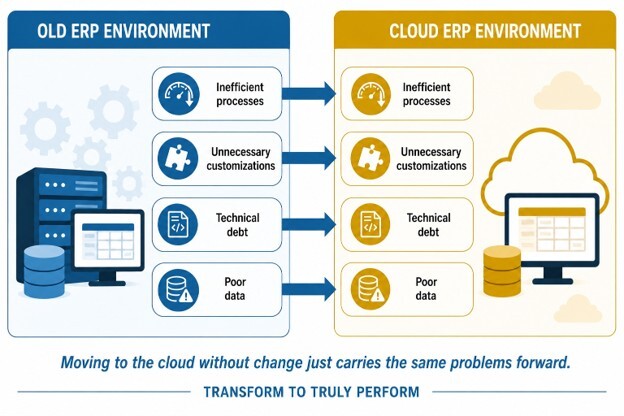
Cloud exposes what you already are.
That’s one of the reasons preparation matters so much before an ERP migration. Duplicate customer records, inconsistent processes, workarounds everyone assumes are normal, customizations nobody remembers requesting, and tasks that only work because Jake in Operations knows which buttons not to push. None of these disappear when you move to the cloud.
A good ERP migration checklist starts there, not with the technology.
If you’re planning a move to Dynamics 365 Business Central, the temptation is to focus on getting the existing system into the new environment as quickly as possible.
But as I discussed in the first article in this series, cloud migration changes more than where your ERP runs. It changes how the business will operate around it.
So before you pack everything up, decide what’s actually worth taking with you.
- Clean the data.
- Question the workarounds.
- Review the customizations.
- Clarify ownership.
- Put governance in place.
The goal isn’t a perfect system before you migrate. It’s a cleaner, more disciplined starting point so Business Central can help improve the way the business operates instead of inheriting problems you already know how to fix.
Why is preparation more important than the cloud platform?
A modern cloud ERP can give you better tools, but it can’t compensate for poor data, inconsistent processes, or weak governance. Preparation determines what you’re giving the platform to work with.
It’s easy to put most of the attention on the new system.
- What can Business Central do?
- How quickly can we implement it?
- Which features will we gain?
Those are reasonable questions, but they can create a speed bias that makes merely getting to the cloud feel like the goal.
It isn’t. The goal is to operate better once you get there.
That distinction matters because an ERP migration often looks simpler from a distance than it does once you start opening doors.
- A process that seemed straightforward may depend on three workarounds.
- A report may rely on data entered differently by two departments.
- A customization everyone assumed was critical may turn out to support a process the business no longer needs.
This is where ERP migration preparation earns its keep. Good ERP migration planning gives you time to identify that complexity and decide what to do about it, rather than discovering it halfway through the project.
Microsoft’s cloud adoption guidance emphasizes preparing people, processes, and technology rather than treating cloud adoption as a technology exercise alone. That’s the right mindset for an ERP migration too.
Business Central can provide the foundation for a cleaner, more disciplined way of operating. But the platform shouldn’t be expected to make those decisions for you.
Before you migrate, the business needs to decide which processes make sense, which data can be trusted, which customizations still earn their keep, and who owns the decisions going forward.
That’s why I view an ERP migration checklist as more than a technical project plan. It’s a readiness exercise. The better you understand what you have before you move it, the better chance you have of building something you’ll actually want to live with afterward.
What should you clean up before moving ERP to the cloud?
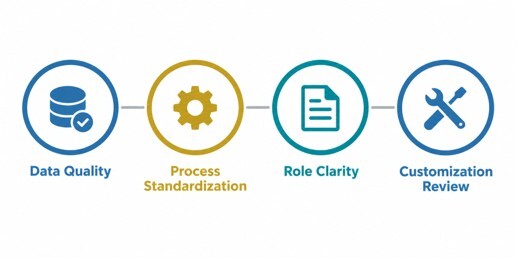
Before moving ERP to the cloud, clean your data, standardize your processes, clarify roles, and review existing customizations. The goal is to remove unnecessary complexity before it becomes part of your new environment.
Your ERP migration checklist should focus on four areas.
1. Start with the data
Migration doesn’t improve data simply by moving it somewhere new. Duplicate customers, inconsistent item numbers, outdated vendors, incomplete records, and questionable opening balances can undermine reporting and decision-making just as easily in the cloud.
This is why ERP data cleanup should happen before migration whenever possible. Decide what needs to move, what can be archived, what needs to be corrected, and who is responsible for validating it. If nobody trusts the data going in, a new ERP isn’t going to make them trust it coming out.
2. Standardize the processes you want to keep
Most businesses develop workarounds over time. Some solve legitimate problems. Others survive because the “that’s how we’ve always done it” mindset is remarkably good at avoiding retirement.
Before migration, look at how core processes actually work across departments. If two teams handle the same transaction differently, ask whether there’s a business reason for the difference.
ERP process standardization doesn’t mean forcing every situation into the same box. It means eliminating unnecessary variation before you design the new environment around it.
3. Clarify roles and responsibilities
If a process depends on one person knowing what happens next, you don’t have a process. You have a dependency.
This is where our friend Jake in Operations becomes relevant again. Jake may know the workaround, which report needs a manual adjustment, and what to do when an exception occurs. Your ERP migration preparation should turn that knowledge into defined roles and documented procedures rather than expecting Jake to carry it into the new system in his head.
4. Review every customization
I’m not against customization. I’m against customization that has outlived its business case.
An ERP customization review should be part of your preparation for a Business Central migration.
Look at existing modifications and ask why each one exists.
- Is the underlying need still there?
- Can standard Business Central functionality handle it now?
- Could a process change eliminate it altogether?
Every customization you carry forward creates something the business may need to maintain, test, document, and evaluate again later. Keeping one because “we already have it” isn’t much of a return-on-investment calculation.
A good cleanup doesn’t mean stripping away everything unique about the business. It means being deliberate about what earns a place in the new environment.
What governance should be established before ERP migration?
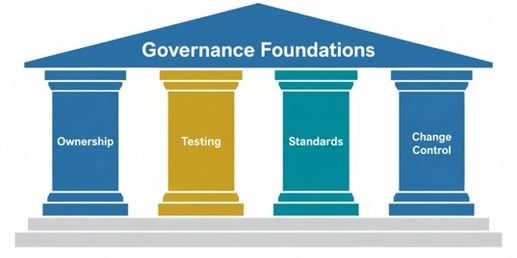
Before ERP migration, establish clear ownership, testing procedures, documentation standards, and change control. Good governance gives the business a structure for making decisions and maintaining control long after go-live.
Governance can sound like something that belongs in a policy manual. In practice, it answers some very basic questions:
- Who owns the data?
- Who approves a process change?
- Who decides whether a customization is necessary?
- Who signs off that the system is ready?
If the answers to any of these include “we’ll figure that out during the project,” add it to your ERP migration checklist now.
Start with ownership and accountability. ERP data governance requires more than assigning IT responsibility for the database. The people closest to the business processes need clear accountability for data quality, validation, and the rules that determine how information is created and maintained.
Testing needs the same discipline. An ERP testing strategy should define what will be tested, who will test it, how issues will be documented, and what constitutes approval. Don’t wait until go-live is approaching to find out that Finance assumed Operations was testing something and Operations assumed Finance had it covered.
Documentation matters for the same reason. Good ERP documentation captures processes, responsibilities, decisions, and exceptions so knowledge doesn’t live exclusively in someone’s head. Jake deserves a vacation.
Finally, establish change control. A cloud system will continue to evolve after implementation, and so will your business. Cloud migration governance gives you a way to evaluate requests, understand their impact, assign responsibility, and decide which changes are worth making rather than letting the environment gradually accumulate complexity again.
Microsoft’s cloud governance guidance emphasizes clear accountability, defined roles and responsibilities, and ongoing governance. Those principles are just as important when you're establishing how your Business Central environment will be managed.
Governance isn’t there to slow the business down. Done well, it prevents the confusion and rework that slow the business down later. That’s an important part of cloud ERP readiness: knowing not only that you can migrate, but that you’re prepared to manage the system responsibly once you do.
What happens if you skip ERP preparation?
Skipping ERP preparation increases the risk of delays, cost overruns, poor adoption, and operational disruption. The problems usually aren’t caused by the cloud platform itself. They’re unresolved business issues showing up at the worst possible time:
- Poor preparation tends to create a chain reaction.
- Bad data takes longer to validate.
- Undocumented processes create questions nobody budgeted time to answer.
- An overlooked customization suddenly becomes critical.
- Testing uncovers an exception that should have been identified months earlier.
Each problem may be manageable on its own. But when several appear at once, the schedule starts slipping and costs start climbing.
That’s why good ERP migration planning needs to account for more than technical tasks and target dates. It should give the business enough time to uncover dependencies, make decisions, test processes, and prepare users for what will change.
That last part matters. You can complete a technically successful migration and still struggle after go-live if employees don’t understand the new processes or why they’re being asked to work differently. ERP change management should begin before migration, not after users start pushing back.
This is also where preparation becomes financial. Rework costs money. Delays cost money. Productivity lost while employees struggle with a poorly understood system costs money. And if people start rebuilding old workarounds because the new process isn’t working for them, you can end up paying for a modern ERP while preserving many of the problems you intended to leave behind.
A thorough ERP migration checklist won’t eliminate every surprise. ERP projects have a way of keeping everyone humble. But it can help make sure the surprises you encounter are genuinely unexpected, not problems the business could have addressed before the project began.
How does an ERP migration checklist protect ROI?
An ERP migration checklist protects ROI by reducing avoidable rework, controlling project risk, and helping the business get value from its new ERP sooner. The cleaner and more prepared the starting point, the less time and money you spend fixing preventable problems during and after migration.
From a CFO’s perspective, this is where preparation becomes easier to quantify.
- Every issue you resolve before migration is one less issue competing for project resources later.
- Cleaning data before it reaches the new environment reduces remediation work.
- Standardizing a process before configuring it reduces redesign.
- Reviewing customizations before rebuilding them helps prevent the business from paying to recreate functionality it may no longer need.
That’s also why I don’t view cloud ERP readiness as an IT metric. It’s a business and financial one.
PwC makes a similar case for taking a value-based approach to cloud ERP, including reducing technical and business process debt and limiting unnecessary modifications. The objective isn’t simply to get the system running in the cloud. It’s to create an environment that can deliver greater value over time.
Good preparation also gives leadership a more realistic picture of what the migration will require. That improves budgeting, reduces surprises, and makes it easier to distinguish necessary investment from avoidable cost.
You’re going to spend money on an ERP migration. The question is whether that investment leaves you with cleaner processes, better information, and stronger controls, or simply a new place to keep the same old problems.
Chris’s ERP migration checklist: Are you ready to move?
Before you move ERP to the cloud, make sure the business is ready to operate differently once it gets there. A practical ERP migration checklist should tell you whether the foundation is strong enough to move forward or whether there’s still work to do.
Before I’d call a business ready for a Microsoft Dynamics 365 Business Central migration, I’d want clear answers to these questions:
- Is our data clean enough to trust?
- Are our core processes standardized where they should be?
- Do we know which customizations we actually need?
- Are ownership and decision-making responsibilities clear?
- Do we have a testing and validation plan?
- Are important processes and exceptions documented?
- Are employees prepared for what will change?
- Do we have governance in place for the system after go-live?
You don’t need perfect answers to every question before the project can begin. But you should know where the gaps are, who owns them, and how they’ll be addressed.
The lesson is simple: Clean systems migrate well. Messy systems migrate their mess.
The cloud can give you a better platform. Preparation is what gives you a better business on the other side.
Prepare the business, then move the ERP
Cloud migration can be a tremendous opportunity to improve how your business operates, but the improvement doesn’t come from changing platforms alone. It comes from deciding what should change before you move.
That’s been the theme throughout this series. Leadership needs to treat migration as a business change, not just an IT project. In the second article in the series, I looked at how shortcuts like lift and shift can carry old problems forward. And a strong ERP migration checklist helps you identify what needs to be cleaned up, standardized, documented, or governed before those problems follow you into the cloud.
You don’t have to fix everything before you begin. But you do need to know what you’re bringing with you.
If you’re considering a move to Dynamics 365 Business Central and want to talk through what should come with you (and what probably shouldn’t), let's talk.