
Why do some organizations seem to spend every day putting out ERP fires while others operate with far fewer disruptions?
The answer usually isn't found in the latest problem. It's found in the underlying cause.
Think about a vehicle that keeps breaking down. Most mechanics don't start by replacing random parts. They look for the root cause.
The same principle should apply to ERP.
Over the years, I've seen companies invest enormous amounts of time and energy responding to recurring system issues. Inventory discrepancies, workflow bottlenecks, failed integrations, and approval delays often trigger a steady stream of urgent fixes. The temptation is to focus on extinguishing each issue as quickly as possible.
But speed isn't always the problem.
In many cases, the real issue is that the ERP environment was designed in a way that continually creates exceptions. The business becomes so accustomed to managing those exceptions that nobody stops to ask why they exist in the first place, and the workarounds become part of the standard operating procedure.
That's why ERP design best practices for manufacturing deserve more attention from leadership teams. Good design reduces complexity, improves consistency, and creates a more predictable operating environment.
Poor design does the opposite, generating unnecessary exceptions that eventually turn into operational noise.
This is the third and final article in my stability series. In the first two articles, I explored the operational impact of ERP downtime and what stability actually looks like.
In this final installment, I'll focus on the design decisions that often determine whether an organization spends its time operating efficiently or constantly dousing those fires.
For organizations using Dynamics 365 Business Central, stability is not just the result of good governance and disciplined change management. It's also the result of design decisions that make the system easier to operate, support, and scale over time.
Why firefighting happens
Most ERP firefighting can be traced back to a handful of predictable design and governance issues.
When I talk with manufacturing and distribution leaders, I rarely hear them complain about a single catastrophic ERP failure.
More often, they're frustrated by a steady stream of exceptions that require manual intervention. A shipment can't be processed because of missing data. A purchasing workflow doesn't route correctly. An integration fails overnight and isn’t discovered until the next morning, when orders, inventory, or reporting data suddenly don't look right.
Over time, those interruptions become part of the daily routine.
Here are the most common causes:
Exceptions become normal
Teams create workarounds to keep operations moving. The problem is that temporary fixes often become permanent processes. Before long, employees are spending more time managing exceptions than following the intended workflow.
Data becomes unreliable
When item records, vendor information, inventory attributes, or operational data aren't maintained consistently, users stop trusting the system. That lack of trust encourages more manual verification, more spreadsheets, and more opportunities for errors.
Processes lack ownership
When nobody owns a workflow end-to-end, issues tend to linger. Problems are escalated, discussed, and revisited, but rarely resolved at the source.
Customizations create brittleness
A workflow modification may solve a specific problem today, but every customization increases complexity and can create operational debt over time.
Integrations break silently
A visible outage gets immediate attention, while a partially failed integration may not. By the time the issue is discovered, the business may already be dealing with inventory discrepancies, reporting issues, or customer service problems.
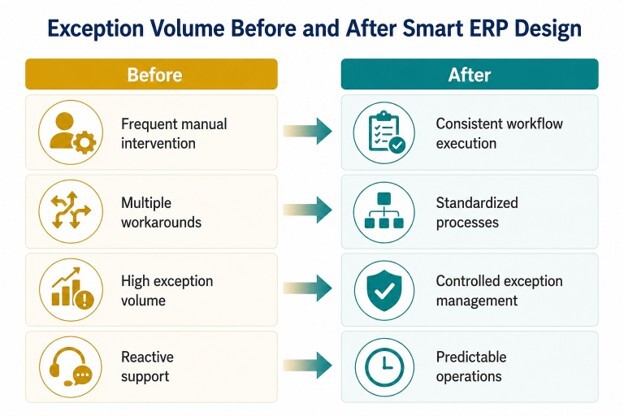
The common thread across all of these issues is that they increase exception volume. That's why reducing ERP exceptions should be viewed as a design objective, not simply an operational goal.
ERP design best practices for manufacturing: How do you design an ERP system so it scales without creating more exceptions?
Organizations scale more successfully when they standardize workflows, simplify decisions, maintain clean data, and limit complexity as transaction volume increases.
Growth often reveals weaknesses that were already present.
A workflow that functions adequately for a small operation may struggle when transaction volumes double. An approval process that seems manageable with ten users can become a bottleneck with fifty. As the business grows, every inefficiency becomes easier to see.
That's one reason ERP stability often feels easier to maintain in smaller businesses. A few manual checks or workarounds may not create a lot of disruption when transaction volumes are low. But as the business grows, those same workarounds become harder to manage and more expensive to sustain.
Good ERP design usually comes down to a handful of practical principles:
Standardize core workflows
ERP workflow standardization is one of the most effective ways to support long-term scalability. Standardized workflows create consistency across departments, locations, and teams. They reduce confusion, make training easier, and provide leadership with greater visibility into operations.
Simplify decision points
Every additional approval, exception path, or special-case workflow introduces complexity. Complexity isn't always avoidable, but it should be intentional. If a decision doesn't add meaningful business value, rethink it - it may not belong in the process.
I've come across workflows that require multiple approvals for decisions that carry very little risk. Each approval may have been added for a good reason, but over time those layers create delays, confusion, and unnecessary effort.
When leaders complain that processes feel slow, the issue may not be the ERP system itself, but the number of decision points that have been added into the workflow.
Create clean master data
Item records, customers, vendors, dimensions, and inventory attributes influence nearly every transaction inside the ERP environment. A business that maintains clean, well-governed data generally spends less time chasing down errors and more time operating with confidence.
Build upgrade-safe ERP extensions
For Business Central users, extensions provide an important advantage. Microsoft's extension model allows a company to add functionality without modifying core application code. When properly implemented, upgrade-safe ERP extensions help organizations address legitimate business requirements while preserving future upgrade flexibility.
Avoid exception-driven workflows
I've seen teams build processes around unusual scenarios because "it only happens once in a while." The problem is that after enough exceptions are accommodated, they stop feeling like exceptions at all. They become the process.
Good design focuses on the most common workflows first and handles exceptions in a controlled, predictable way.
Why do custom ERP workflows often create more problems than they solve?
Custom ERP workflows often create long-term complexity, increase testing requirements, and make upgrades more difficult to manage.
Most customizations begin with good intentions. I've rarely seen one requested for a bad reason.
Usually, someone is trying to solve a legitimate business problem. The challenge is that every customization creates a long-term commitment. Someone has to maintain it, test it, document it, and evaluate it during future upgrades. What starts as a small change can gradually become another dependency the business has to manage.
The immediate benefit is often easy to see. The long-term impact – not so much. A modification solves a specific problem, everyone moves on, and the business continues operating.
Years later, though, that same customization may need to be revisited during an upgrade, integration project, or process redesign.
The challenge is that ERP systems rarely remain static.
Business requirements evolve: new users join the company, software updates are released, integrations change. Every customization must continue functioning correctly as the surrounding environment changes.
That's why I encourage companies to approach customization the way they'd approach renovating a house. If moving a piece of furniture solves the problem, you don't start knocking down walls.
In many cases, a process adjustment or configuration change provides a better long-term outcome than custom development.
This is especially important when it comes to manufacturing process automation risks. Automation can improve efficiency dramatically, but poorly designed automation can also make small problems bigger and create new ones along the way.
For Business Central environments, I generally encourage an out-of-the-box-first mindset. That doesn't mean customization is never appropriate. It means customization should have a clear business case and a clear long-term ownership strategy. It means that we have to ask the question, “Why do we want this feature/change?” Just because you’ve always operated that way doesn’t justify keeping it that way.
The goal isn't to eliminate flexibility. It's to avoid creating unnecessary complexity that the business will eventually have to support, troubleshoot, and upgrade.
The CFO lens: Firefighting is expensive
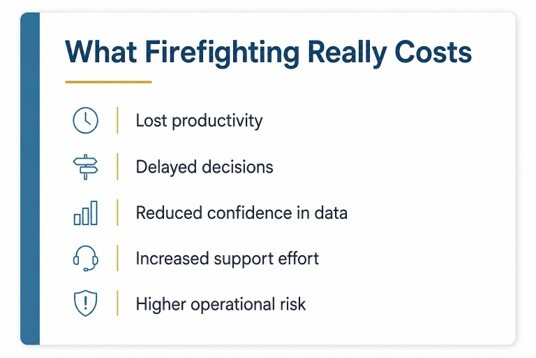
From a financial perspective, firefighting is often viewed as an operational issue. In reality, it's a cost issue.
Every exception consumes time. Every workaround creates inefficiency. Every failed integration or recurring workflow problem requires resources that could be focused elsewhere.
Organizations don't always see these costs because they're spread across multiple departments. Operations absorbs part of the impact. Finance absorbs another portion. Customer service, purchasing, and warehouse teams absorb the rest.
That's one reason firefighting can be tough to quantify:
- Finance may see the reconciliation effort.
- Operations may see the delays.
- Customer service may see the impact on customers.
Viewed individually, each issue appears manageable. Viewed together, they often represent a significant cost that rarely appears on a budget report.
Over time, those costs accumulate.
That's why ERP integration reliability and disciplined system design matter. The objective isn't simply reducing support tickets. It's improving predictability, protecting margins, and creating a more efficient operating environment.
Stable systems allow businesses to focus on growth and improvement rather than constant recovery.
Executive checklist
Leaders evaluating ERP stability need to ask a few straightforward questions:
- What percentage of daily work involves exceptions?
- Which exceptions are recurring and self-inflicted?
- Which integrations generate the most issues?
- Who owns process outcomes when problems occur?
- Which workflows rely on workarounds rather than standard processes?
The answers often reveal opportunities to improve stability without adding technology or increasing spending.
Chris's rule: Design for fewer exceptions, not faster fixes
Organizations often invest significant energy into responding to problems more efficiently. Response capability matters, but the larger opportunity is reducing the number of problems that occur in the first place.
The real value of ERP design best practices for manufacturing isn't faster fixes—it's creating fewer exceptions in the first place.
The most stable ERP environments aren't necessarily the ones with the fastest support teams. They're the ones that generate fewer exceptions, require fewer workarounds, and create fewer surprises for the people who depend on them every day.
Stability doesn't happen by accident. It's the result of deliberate decisions about processes, data, integrations, governance, and ownership. Those decisions may not always be visible day to day, but their impact shows up every time the business operates without disruption.
Missed the earlier articles in this series?
If your team spends too much time managing exceptions, workarounds, or recurring ERP issues, the problem may not be the individual incidents themselves. It may be the design decisions driving them.
At Clients First Business Solutions, we work with manufacturers and distributors to identify stability risks, reduce unnecessary complexity, and create ERP environments that support growth without generating more operational friction.
If your team is spending too much time putting out ERP fires, let's talk about what's causing them—and how better design can help prevent them.