
It's 9 a.m., and your sales team is trying to confirm an order. The warehouse says the inventory is available. Your ecommerce platform says something different.
Meanwhile, Susan in accounting is reconciling yesterday's transactions, and Dave, the operations manager, is updating a spreadsheet that has somehow become essential to keeping the business running. Nobody remembers exactly when that happened. Even Columbo might have trouble figuring it out. And your distribution ERP isn't offering many clues.
Common Distribution Challenges Over Time
Your distribution business probably looks a lot different than it did ten years ago. You may have added warehouses, ecommerce channels, marketplaces, EDI customers, or even acquired another company. But there's a good chance your distribution ERP is still operating much the way it did back then.
And for a while, that might have been perfectly fine.
The trouble starts when the business keeps changing, but the systems and processes supporting it don't. Every new warehouse, sales channel, or customer requirement adds another layer of complexity. And somehow, the people who were supposed to benefit from automation are spending more time keeping everything running.
The ERP hasn't necessarily failed. It may be doing exactly what it was designed to do. The question is whether that's still enough for the business you're running today.
This is the first article in my three-part series, The New Distribution Operating Model. I'll look at why traditional ERP environments struggle to keep up with modern distribution, what that means for day-to-day operations, and when it makes sense to consider ERP modernization.
We'll also explore how solutions like Microsoft Dynamics 365 Business Central can provide a more flexible foundation for growth.
What is a distribution ERP?
A distribution ERP connects the core processes that keep a distribution business running, including inventory, purchasing, sales orders, fulfillment, pricing, and financial management. Traditionally, that meant bringing these functions together in one system so employees could work from consistent information.
That basic purpose hasn't changed. What has changed is everything the ERP needs to work with.
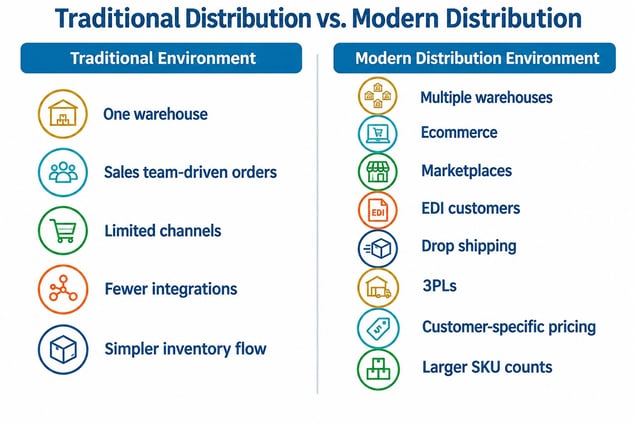
Consider a distributor that once managed orders through a sales team and shipped products from a single warehouse. Today, that same company might sell through ecommerce, marketplaces, and EDI customers while coordinating inventory across multiple locations and third-party logistics providers.
The traditional ERP model wasn't necessarily designed for that kind of environment. Adding another warehouse or sales channel might have been relatively straightforward. Keeping all those systems, transactions, and processes connected is another matter.
That's why the modern, intelligent distribution ERP needs to do more than manage transactions. It needs to provide a reliable foundation for distribution operations while supporting ERP integration with the applications that handle specialized functions.
And that doesn't mean everything belongs inside the ERP.
A warehouse management system, ecommerce platform, or shipping application may be better suited to a particular job. The important question is whether those systems exchange information reliably enough for employees to make decisions without constantly checking, correcting, or reconciling data.
That's a significant shift in how we should think about ERP for distributors. The goal isn't simply to have one system doing everything. It's to have a connected environment that supports the way the business actually works.
How do you know if your distribution business has outgrown its ERP?
The clearest sign that you've outgrown your distribution ERP isn't necessarily a system failure. It's the growing amount of work your employees have to do just to keep everyday processes moving.
And because that extra work develops gradually, it can be surprisingly easy to accept as normal.
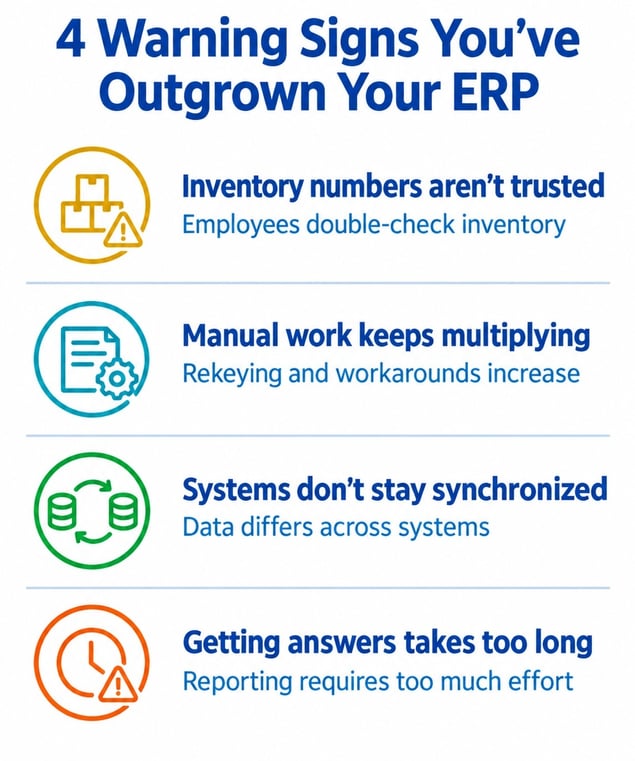
Here are four warning signs I recommend paying particular attention to:
- Nobody completely trusts the inventory numbers. Employees double-check quantities before promising orders, warehouses maintain their own records, and purchasing decisions sometimes depend on which spreadsheet someone consulted last. Poor inventory visibility also has financial consequences, as I discussed in ERP Inventory Accuracy and Cash Flow.
- Manual work keeps multiplying. Orders require rekeying, approvals happen outside the system, and employees spend time correcting information that should have flowed automatically. What began as an occasional workaround becomes part of the daily routine.
- Systems don't stay synchronized. Ecommerce platforms, warehouse applications, and the ERP may each have different information about orders, customers, or inventory. Employees become the unofficial integration layer, moving data between systems and resolving discrepancies.
Getting answers takes too long. Managers need timely information about inventory, margins, orders, and operational performance. But getting those answers often means someone has to export data, combine reports, and explain
None of these problems necessarily means the ERP is incapable of processing transactions. The issue is that the business has become increasingly dependent on manual intervention to make those transactions work.
And that's where the costs begin to add up.
The extra hours spent reconciling data, correcting orders, and maintaining workarounds may not appear as a separate line item in the ERP budget. But those are real operating costs, and they tend to increase as transaction volumes, locations, and customer demands grow.
How distribution complexity outgrows traditional ERP
Most distributors don't deliberately make their operations more complicated. Complexity usually arrives one perfectly reasonable business decision at a time.
A new warehouse helps serve customers faster. An ecommerce platform opens another sales channel. An acquisition brings new products, customers, and perhaps an entirely different set of applications or processes.
Each decision makes sense. But each also introduces new processes, data, and responsibilities that the existing ERP may not have been designed to accommodate.
The problems often start with how those changes are handled.
Rather than reconsidering the underlying processes, companies add customizations, manual steps, and temporary fixes. Some of those fixes work so well that nobody wants to touch them. Others become permanent simply because everyone is too busy to revisit them.
I've written about this pattern in ERP Overengineering in Distribution, where seemingly small adjustments can gradually make the environment harder to manage.
The financial impact can be just as easy to overlook. Maintaining customizations, reconciling disconnected data, and supporting aging integrations all require time and attention. Those expenses don't always show up in the original technology budget, but they affect the cost of running the business.
This is why legacy ERP modernization isn't simply a technology decision. It's an opportunity to examine how the business operates, which processes still make sense, and where complexity has accumulated without delivering much value.
The goal isn't to eliminate every customization or specialized application. It's to make sure each one earns its place and is solving an identified challenge.
When should a distributor modernize or replace its ERP?
A distributor should consider ERP modernization when its existing systems make growth harder to manage, increase operational risk, or require more manual effort than the business can reasonably sustain. But that doesn't automatically mean it's time to replace the ERP.
I'd start by looking at what isn't working and why.
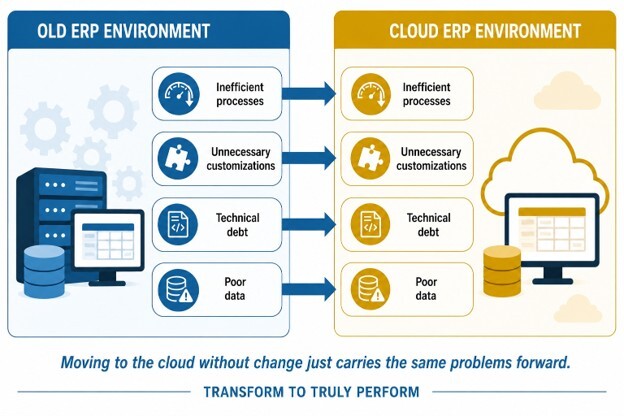
Take inventory discrepancies. If they’re caused by inconsistent processes or poorly configured integrations, replacing the software may simply move those problems into a newer system. The same goes for reporting delays caused by unreliable data or approval processes that have accumulated unnecessary steps.
Sometimes the better answer is to tackle improvements one at a time: simplify workflows, improve ERP integration, reduce customizations, or upgrade the existing platform.
But there comes a point when maintaining the current environment costs more than it delivers. That doesn't necessarily show up in the software budget. It appears in the employees needed to manage workarounds, the difficulty of adding new locations or sales channels, and the time spent supporting systems that don't work well together.
These are the kinds of costs I explore in ERP Architecture and Operating Costs. The initial investment matters, but so does the ongoing cost of keeping the business running.
When evaluating whether to modernize or replace an ERP, I'd focus on three questions:
- Can the existing system support the next stage of growth? Consider additional warehouses, acquisitions, larger SKU counts, and new customer requirements.
- Can the business reduce manual work without adding more complexity? Automation should simplify processes, not create another collection of exceptions that employees must manage.
- Will the technology environment become easier to maintain and adapt? A modern platform should make it easier to connect applications, access information, and accommodate changes without rebuilding everything.
The objective isn't to buy newer software simply because it's available. It's to create an operating environment that can support the business today and adapt as it changes.
And sometimes that means replacing the ERP. Other times, it means finally addressing the problems that have been accumulating around it.
What should a modern distribution ERP support?
A modern distribution ERP should give distributors a reliable foundation for managing their core business processes while making it easier to connect the systems that support them.
That sounds straightforward. But it requires thinking beyond what the ERP can do on its own.
Many distributors rely on specialized applications for warehouse management, ecommerce, shipping, or EDI. Those systems don't necessarily need to be replaced or absorbed into the ERP. They need to work together so information moves reliably and employees aren't constantly filling the gaps.
Ryan Howe explores this idea in Connected ERP: Why ERP Integration Matters, where he explains why ERP value increasingly depends on how well the system connects with the rest of the business.
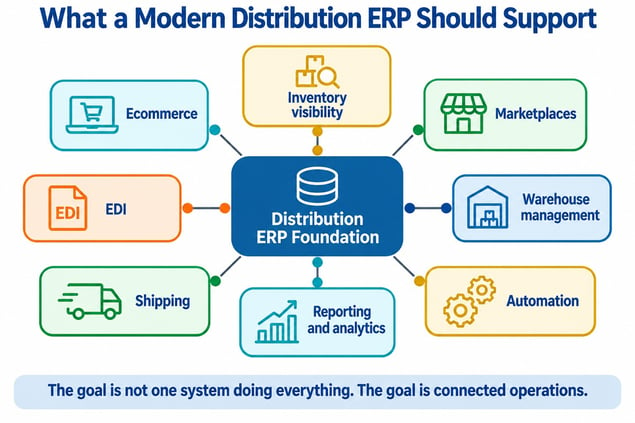
For distributors evaluating distribution ERP software, let’s focus on a few essential capabilities:
- Reliable inventory visibility across warehouses and locations, with consistent information supporting purchasing, order processing, and fulfillment.
- Connected sales channels that allow ecommerce platforms, marketplaces, EDI customers, and other applications to exchange information with the ERP.
- Flexible processes and automation that reduce repetitive work without creating more customizations or unnecessary complexity.
- Accessible reporting and analytics that help managers understand what's happening without waiting for someone to assemble the numbers manually.
This is where platforms like Microsoft Dynamics 365 Business Central can play a role. Rather than requiring every process to operate inside the ERP, Business Central can serve as a central foundation while connecting with specialized applications.
Clients First's multichannel marketplace integration with Cleo illustrates how Business Central for distribution can participate in a broader connected environment.
The important distinction is that modernization isn't simply about adding capabilities. It's about creating an operating model where those capabilities work together without requiring employees to hold everything together manually.
The business has changed. Has your ERP kept up?
A distributor can operate successfully for years without questioning whether its ERP still fits the business. But as warehouses, sales channels, customer requirements, and transaction volumes grow, the gap between what the system was designed to support and what the business truly needs can become harder to ignore.
That's the real challenge of ERP modernization. It's not simply about replacing technology. It's about building an operating model that supports growth without requiring employees to work harder just to keep everything connected.
My next article in this series will explore why EDI automation doesn't always eliminate manual work, particularly when employees spend their days managing transaction exceptions. Then, in the final article, we'll look at omnichannel distribution and the challenge of making reliable inventory promises across multiple sales and fulfillment channels.
Both topics reinforce the same point: Modern distribution depends on systems and processes working together, not just individual applications doing their jobs.
If you're questioning whether your current ERP can keep up with your distribution business, let's talk. At Clients First, we can help you evaluate where the problems originate, what can be improved, and whether a more modern ERP foundation makes sense for your next stage of growth.