Business Central AI Agents: Building Custom Agents
Your business processes are unique. Now your Business Central AI agents can be too.
Your team probably has processes that do not fit neatly into standard software.
Maybe someone reviews sales orders for margin problems before they are approved. Someone checks customer credit limits. Another employee looks for shipping discrepancies, missing information, or other exceptions that could cause problems later.
These tasks matter. But they also consume time and depend on someone consistently catching the right issue at the right moment.
Microsoft's Agent Designer for Dynamics 365 Business Central introduces another option.
Instead of relying only on Microsoft's prebuilt Business Central AI agents, organizations can begin creating custom agents around their own Business Central processes using natural-language instructions rather than starting with custom code.
For Business Central customers, that raises an interesting question: What repetitive work could an AI agent handle for your team?
What's Changing With AI Agents in Business Central
Business Central already includes built-in agents designed for specific processes.
The Sales Order Agent, for example, can interpret natural-language or email instructions and help create sales documents. The Payables Agent can extract information from vendor invoices and match it against purchase orders.
These Dynamics 365 Business Central AI agents demonstrate an important evolution in how AI is being used within ERP. Instead of simply answering a question or generating content, an agent can interpret a goal, work with Business Central data, and take defined actions within established limits.
Agent Designer takes that concept a step further.
With the agent design experience in Microsoft's AI Development Toolkit, organizations can prototype agents for processes that Microsoft's standard agents may not address. A Business Central administrator, consultant, product owner, or knowledgeable business user can define an agent's purpose and instructions using natural language rather than building the entire experience in AL code.
That does not eliminate development for every scenario. But it significantly lowers the barrier to exploring where agent-based automation could fit into your Business Central environment.
What Exactly is Agent Designer?
Agent Designer is an experience for creating, testing, and refining custom AI agents in Business Central.
It uses the same runtime that supports Microsoft's built-in agents, which means custom agents operate within Business Central's existing security model, permissions, audit trail, and human oversight.
There are several important things to understand before experimenting with it:
- It's designed for sandbox-first prototyping. You can experiment with an agent in a sandbox environment before introducing it into live business processes.
- Instructions are written in natural language. You describe the agent's role, responsibilities, expectations, and boundaries rather than coding every step.
- Access is controlled through Business Central. Profiles and permission sets determine what information an agent can access and what it can do.
- Agent activity can be reviewed. Execution logs and timelines help you understand how an agent performed a task and troubleshoot unexpected results.
- Custom agents currently have limitations. Some advanced scenarios, including automatically triggering an agent based on an email, event, or schedule, may still require development using the AI Development Toolkit.
In other words, Agent Designer makes prototyping an AI agent more accessible. Turning that prototype into a sophisticated automated process may still require additional development.
What Could You Build With it?
This is where Agent Designer becomes more interesting.
Instead of asking, "What can AI do?", look at the repetitive work already happening inside your organization.
Where are employees repeatedly reviewing information, applying the same business rules, looking for exceptions, or deciding whether something needs additional attention?
Those processes may provide opportunities for an agent.
Potential scenarios could include reviewing sales documents for exceptions, identifying records that require additional financial review, checking information against defined business criteria, or performing an initial review before passing an exception to an employee.
The goal is not necessarily to remove people from the process.
A better first use of an agent may be to handle the repetitive first review so your employees can concentrate on the exceptions and decisions that actually require their expertise.
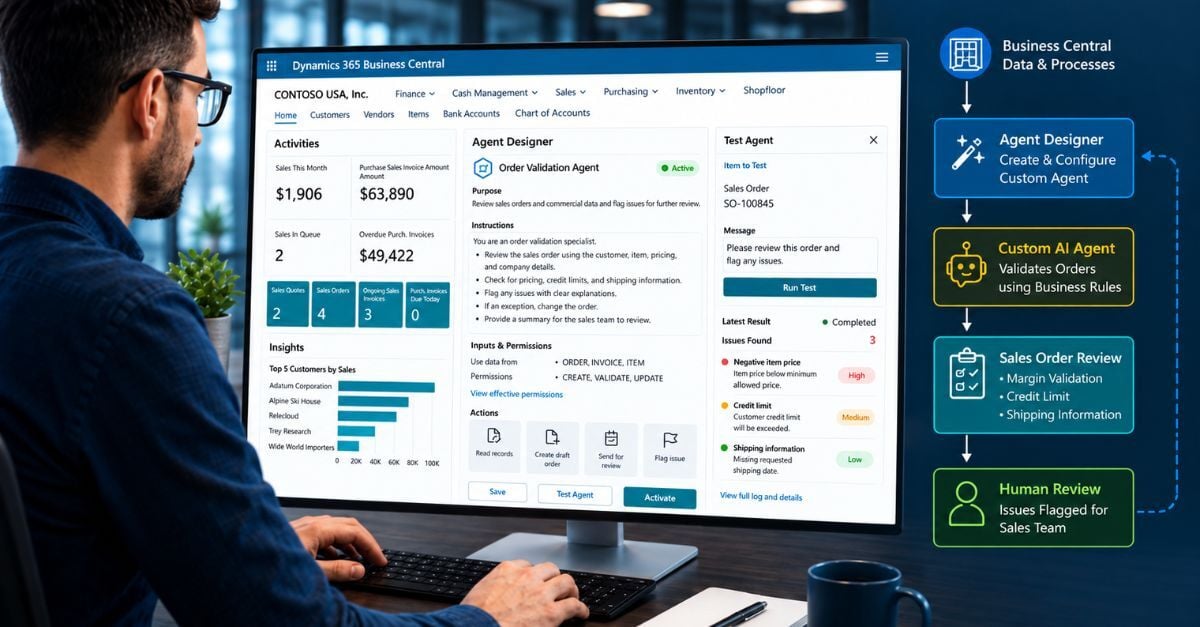
Tech Focus Example: Catching Sales Order Problems Earlier
Consider a distributor processing a high volume of sales orders every day.
The sales team enters the orders, but someone later needs to check for issues such as:
- Orders falling below minimum margin requirements
- Customers exceeding established credit limits
- Incorrect or inconsistent shipping information
Those checks may be straightforward, but performing them manually on every order takes time. They can also be performed inconsistently when employees are busy.
A custom order-validation agent provides a useful example of how Agent Designer could change that process.
Using the Sales Validation template, an agent can be instructed to review a sales order against defined criteria and flag exceptions for a person to review before the order is finalized.
The agent can be configured as read-only, so it cannot modify the sales order. Instead, it identifies potential problems, explains what it found, and leaves the decision to an employee.
The AI performs the first review. Your people remain in control of the decision.
That makes this type of scenario particularly useful for an organization's first agent: the process is focused, the value is easy to understand, and the risk can be tightly controlled.
How Do You Build Your First Business Central Agent?
One of the most significant aspects of Agent Designer is that getting started with AI agents in Dynamics 365 Business Central does not require you to build an agent entirely through code.
Here's what the basic process looks like.
1. Open Agent Designer
From the navigation area in the Business Central role center, select Agent > Create.
If the Agent option is not visible, the appropriate Copilot and agent capabilities may need to be enabled first.
2. Choose How You Want to Start
You can create an agent from scratch or begin with an available template.
For a first experiment, the Sales Validation template provides a useful starting point because it already establishes a foundation for an order-validation scenario.
3. Define the Agent's Identity and Purpose
Give the agent a clear name and describe what you expect it to accomplish.
Avoid starting with an agent responsible for a broad collection of processes. A narrowly defined purpose makes its behavior easier to evaluate.
4. Write the Instructions
This is where much of the agent's behavior is defined.
Using natural language, explain:
- The role the agent should perform
- The steps it should take
- The information it should evaluate
- What constitutes an acceptable result
- When it should stop
- When a person should become involved
Think of these instructions as the agent's operating guidelines.
The clearer its job and boundaries are, the easier it becomes to test whether the agent is behaving as expected.
5. Assign a Profile and Permissions
The agent interacts with Business Central through a user profile and permission set.
These determine what information it can access and what actions it is allowed to perform.
This is one of the most important safeguards when designing an agent. Give it access to what it needs to perform its assigned task, rather than unnecessarily broad access to Business Central.
6. Activate, Test, and Refine
Once activated, you can create tasks for the agent and evaluate the results.
Review the execution log and activity timeline to see what happened during the task. If the results are unexpected, you can adjust the agent's instructions and test again.
The objective should not be to build the perfect agent on your first attempt.
Build. Test. Review. Refine.
Your First Agent Shouldn't Do Too Much
The excitement around AI makes it tempting to start with an ambitious use case.
Resist that temptation.
Good first Business Central agents should be:
- Narrowly focused
- Read-only when practical
- Limited to a clearly defined process
- Working with a limited set of data
- Easy for a human to verify
For example, an agent that reviews a sales order and identifies possible issues is much easier to test and trust than an agent with permission to change and post documents across multiple areas of Business Central.
Once an agent's behavior becomes predictable, its responsibilities can be expanded.
Starting small is not just a technical precaution. It gives your organization an opportunity to learn where AI adds value before putting it into more consequential processes.
What About Security, Permissions, and Human Oversight?
Giving an AI agent access to ERP data should raise questions.
What can it see? What can it do? Who controls it? And can we see what it did?
Business Central addresses these concerns in part through its existing security and permission structure.
Creating and configuring agents through Agent Designer requires the appropriate AGENT-ADMIN permissions. AGENT-DIAGNOSTICS permissions provide access to diagnostic information used to understand agent activity and consumption.
More importantly, the agent itself can be given a defined profile and limited permissions.
That makes it possible to follow an important principle:
Give the agent the minimum access necessary to perform its job.
Agent actions are also logged, allowing administrators to review activity and investigate unexpected results.
These controls are another reason to begin with a tightly defined use case before expanding an agent's responsibilities.
What Can't Agent Designer Do Yet?
Agent Designer makes custom agents in Business Central significantly more accessible, but it is important to understand its current limitations.
One notable limitation is triggering.
Custom agents created through the design experience are currently started by creating a task and, when needed, providing additional context in a message.
More sophisticated scenarios, such as automatically launching an agent when an email arrives, an event occurs, or a schedule is reached, may require developer APIs available through Microsoft's AI Development Toolkit.
That distinction matters.
Agent Designer can make it easier to prototype and validate an idea without code. It does not mean every AI automation scenario can now be implemented without development.
Understanding where Agent Designer ends and development begins is an important part of evaluating a potential use case.
How Are Business Central AI Agents Billed?
Custom Business Central agents can consume Copilot Credits when they run.
Consumption can vary depending on what the agent does, how frequently it runs, and the resources required to complete a task.
That creates another reason to keep an agent focused.
An agent performing a narrowly defined task may be easier not only to secure and test but also to understand from a consumption perspective.
Organizations should monitor usage during testing and refinement so they can better understand expected consumption before expanding an agent to higher-volume processes.
Ready to Experiment? Start With The Process, Not the AI
Agent Designer makes it tempting to immediately start building.
But the better first question may be:
Where does your team spend time repeatedly reviewing Business Central information, applying business rules, or looking for exceptions?
Start there.
Identify one process that is repetitive enough to consume meaningful employee time but narrow enough to test safely.
Then determine:
- What should the agent review?
- What decision or exception should it identify?
- What information does it need?
- What information should it not access?
- Where should a person remain involved?
- How will you determine whether the agent is producing reliable results?
From there, create a sandbox environment, establish the appropriate permissions, build a narrowly focused agent, test it against realistic data, review the execution logs, and monitor its consumption.
Only expand its responsibilities after you understand how it behaves.
AI Agents Are Becoming Another Business Central Tool. The Question Is Where to Use Them
Agent Designer represents an important change in how organizations can approach AI inside Business Central.
Instead of waiting for Microsoft to create an agent for every possible process, Business Central users can begin exploring agents designed around the way their own organizations operate.
But access to the technology is only the beginning.
The real opportunity comes from identifying the right process, establishing the right guardrails, and determining where an agent can reduce repetitive work without introducing unnecessary risk or complexity.
Not sure where an AI agent could make a difference in your Business Central environment?
Clients First Business Solutions can help you identify potential use cases, evaluate whether Agent Designer is the right approach, establish appropriate permissions and guardrails, and determine when additional development may be necessary.
Explore Your First Business Central AI Agent Use Case
FREQUENTLY ASKED QUESTIONS
What is Agent Designer in Microsoft Dynamics 365 Business Central?
Agent Designer is an experience in Business Central for creating and refining custom AI agents. Users can define an agent's purpose and instructions while controlling what it can access and do through Business Central permissions, making it possible to prototype targeted agent scenarios without building the entire experience in code.
Do I need to be a developer to build custom AI agents in Business Central?
Not necessarily. Agent Designer allows administrators, consultants, and knowledgeable business users to create and test agents using natural-language instructions rather than AL code. Development may still be required for advanced integrations, automated triggers, or more complex automation scenarios.
What permissions do I need to create and test agents in Business Central?
Creating agents through the Agent Design Experience requires the AGENT-ADMIN permission set. AGENT-DIAGNOSTICS is used to access diagnostic information about agent activity and consumption. Agent permissions should be kept as narrow as practical, particularly during testing.
How are custom Business Central Copilot agents billed?
Selected agent capabilities use Copilot Credits on a consumption basis. Usage can vary based on the agent's design, frequency of use, and the actions required to complete its tasks. Monitoring consumption during testing can help organizations better understand expected usage before broader deployment.