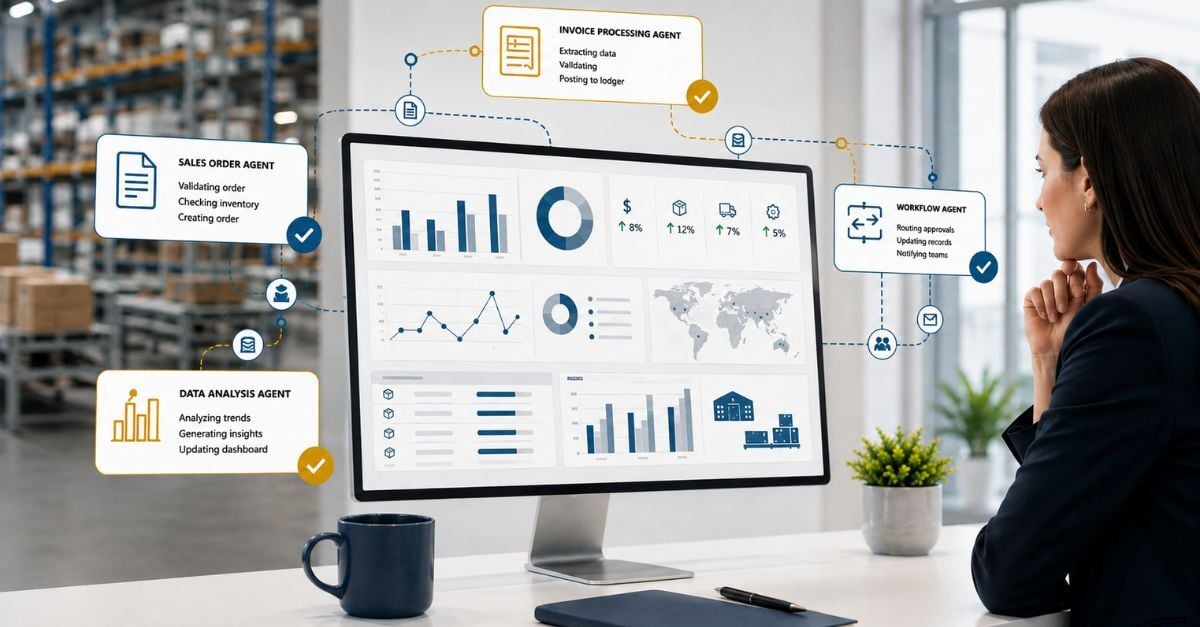
Microsoft has begun to introduce Copilot AI into various aspects of Dynamics 365 Business Central, Microsoft’s Cloud ERP solution, through a growing set of autonomous agents and built-in Copilot features. These AI-powered assistive tools work collaboratively with users.
A user initiates an action, and Copilot responds with suggestions, summaries, or analysis. Examples include Chat, Analysis Assist, Summarize, Autofill, bank reconciliation assist, and marketing text suggestions.
Autonomous Agents in Business Central, such as the Payables Agent and Sales Order Agent, are fundamentally different: they're autonomous AI workers that operate independently in the background within defined boundaries, triggered by events such as an inbound email.
These AI agents represent Microsoft's next step toward Agentic AI, enabling software to complete defined business tasks with minimal human intervention. They monitor mailboxes, extract invoice or order data, match vendors or customers, and prepare drafts for human review under a human-in-the-loop approval model.
Autonomous agents like the Payables and Sales Order Agents are designed to take on the tedious, repetitive work of accounts payable and order entry—monitoring inboxes, extracting invoice and order data, matching records, and drafting documents for review.
Microsoft positions these agents as a way to "eliminate tedious tasks" and "save hours" on invoice management, freeing your team to focus on higher-value work and removing the bottlenecks that slow down high-volume finance and sales operations.
Autonomous Agents in Business Central - Ready for Your Team, Today
Autonomous Agents in Business Central currently include three pre-built agents that come pre-installed in every Business Central cloud environment.
The Payables Agent focuses on automating accounts payable by monitoring a designated mailbox for vendor invoices and using AI to extract key details like vendor, date, and amount. It then creates draft purchase invoices in Business Central for review, helping reduce manual data entry and streamline invoice processing.
The Sales Order Agent is designed to automate the order-to-cash process by reading incoming customer emails and converting them into structured sales quotes or orders. It identifies customers, checks inventory, and prepares documents for review, improving response times, reducing manual order entry, and supporting broader business process automation initiatives.
The Expense Agent, introduced in preview for version 28.1, automates expense management by capturing receipts through email or upload and extracting key information such as merchant, amount, and date. It categorizes and builds expense records to support reimbursement workflows, reducing the need for manual expense entry and coding.
The Agent Designer provides a low-code framework for creating custom agents tailored to specific business processes within Business Central. It allows organizations and partners to extend automation beyond standard scenarios by defining new workflows and agent behaviors aligned to their operational needs.
Building Human-Led, Agent-Operated Teams, Responsibly
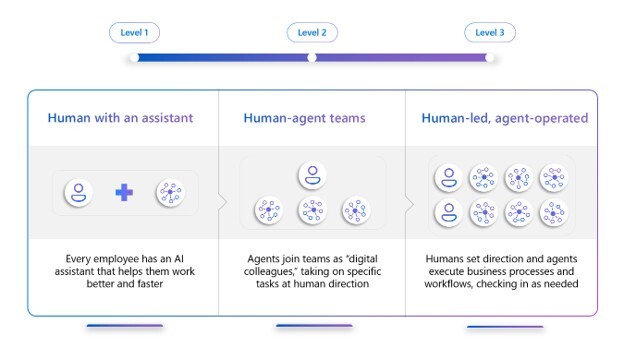
Organizations looking to adopt Autonomous Agents in Business Central should approach the journey as a staged evolution, beginning with a “human-with-an-assistant” model.
At this level, every employee is equipped with tools like Copilot to assist with tasks such as summarization, data analysis, and content generation. The goal is to build familiarity with AI, improve individual productivity, and establish trust in AI-generated outputs before introducing Intelligent Automation.
The next stage is “human–agent teams,” where organizations introduce purpose-built agents into specific processes such as accounts payable or sales order entry. These agents act as digital workers, taking on repetitive, rules-based tasks under human direction while routing outputs for review and approval.
At this level, organizations should focus on clearly defined use cases, governance, and measurable KPIs such as time savings and error reduction to validate ROI.
The most advanced stage is “human-led, agent-operated,” where agents execute autonomous workflows with minimal intervention, and humans primarily focus on oversight, exceptions, and strategic decision-making.
In this model, leadership defines goals and controls, while agents operate continuously in the background to process transactions and drive business outcomes.
A successful Intelligent Automation strategy should move progressively across these stages, starting with low-risk, high-volume processes and expanding over time. Organizations should prioritize governance, transparency, and training at every stage to ensure adoption and control.
By following this structured approach, companies can transition from isolated productivity gains to fully autonomous, scalable operations powered by AI agents.
Practical Steps for Security, Compliance, and Success
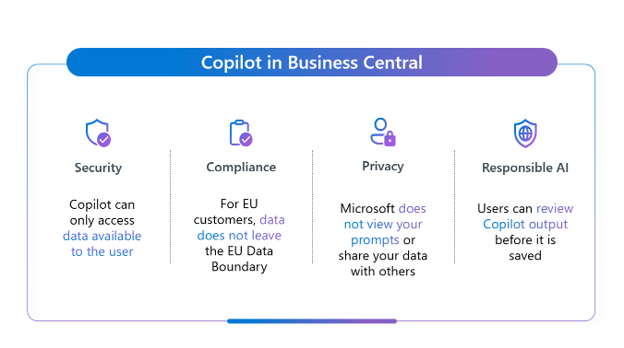
Autonomous Agents in Business Central use permission sets in the same way as users. They are assigned permission sets that define exactly what data, pages, and actions they can access (read, insert, modify, delete, or execute).
When an agent performs a task, it operates under the intersection of its own permissions and the permissions of the user who initiated the task, ensuring it can never exceed the user’s access rights.
This security model enforces the principle of least‑privilege access and ensures agents only act within controlled, auditable boundaries.
AI agents consume Copilot Credits through a consumption-based model, where each action the agent performs, such as analyzing data, processing documents, or generating responses, uses a defined number of credits.
The amount of credits consumed depends on the complexity and type of activity (for example, reading an email, extracting invoice data, or creating a transaction), as well as how frequently the agent is used.
This means organizations effectively “pay per use,” with higher transaction volumes or more complex workflows driving higher credit consumption. A detailed breakdown of agent cost and Copilot Credits can be found on Microsoft Learn.
AI agents in Business Central comply with data privacy laws by operating within Microsoft’s enterprise-grade security, privacy, and compliance framework, which is aligned with regulations such as GDPR and supported by contractual protections like the Data Protection Addendum.
They inherit user permissions and can only access data that the user is authorized to see, ensuring role-based access control and preventing unauthorized exposure of sensitive information.
Additionally, data processed by agents is encrypted, kept within the organization’s tenant boundary, and is not used to train AI models, while built-in controls such as data residency, audit logging, and retention policies ensure ongoing compliance and governance.
Taking the Leap
Adopting Autonomous Agents in Business Central is increasingly important because they transform the ERP system from a passive tool into an AI-powered ERP that drives business operations.
By handling repetitive, high-volume tasks such as invoice processing, order entry, and data analysis, agents significantly reduce manual effort, improve accuracy, and accelerate decision-making, allowing employees to focus on higher-value strategic work.
There are ways to try Business Central AI agents with little or no cost initially. Most Business Central environments include a small allocation of free Copilot Credits each month, which you can use to test agents like the Payables Agent or Sales Order Agent, bringing your organization one step closer to leveraging the power of Business Central with Copilot.
Autonomous agents are still evolving, but now is a good time to understand where they may fit into your Business Central strategy.