
Most integration problems don't start as problems. Everything may work exactly as expected at first.
Six months later, it still looks fine.
Then an upgrade rolls through, a field changes, or an API behaves differently, and suddenly orders stop flowing the way they should.
ERP integration failures often seem to come out of nowhere. Usually, though, the weakness was there long before the failure showed up.
That's what makes fragile integrations so difficult to manage. They can work for years while dependencies accumulate behind the scenes. A custom script gets added here. Another application gets connected there. Documentation falls behind. And no one has much reason to question any of it because everything still works.
Until it doesn't.
And when an integration fails, the impact rarely stays inside IT. Orders can stall, inventory information can lag, customer data can fall out of sync, and employees start filling gaps manually. What starts as a technical problem can quickly ripple through operations and into the financials.
My first article in this series, examined why ERP value increasingly depends on the systems connected to it. Now let's look at the other side of that equation: why those connections become fragile, how to recognize the risk, and what it takes to build integrations that can withstand change.
What causes ERP integration failures?
ERP integration failures usually happen because the integration environment changes while the architecture around it doesn't. New applications get connected, business processes evolve, APIs change, and what started as a straightforward integration gradually develops more dependencies.
That doesn't mean the original integration was poorly designed. A connection built for two systems may have been exactly what the business needed at the time. The problem comes when each new need is solved independently without considering how it affects the larger ecosystem.
Over time, those decisions can create dependencies that aren't obvious from the outside:
- One application expects data in a particular format.
- Another depends on an update happening first.
- A custom process handles an exception that only one person fully understands.
- Everything may continue working, but the margin for change gets smaller.
And failure doesn't always mean data stops moving altogether. Sometimes information arrives late, a field stops updating, or two systems fall out of sync. Those problems can be harder to catch because users may compensate for them before IT even knows something is wrong.
Preventing ERP integration failures starts with understanding those dependencies as part of an overall integration architecture, rather than treating every connection as a separate project.
What is a point-to-point integration?
A point-to-point integration directly connects two systems so they can exchange information without a centralized integration layer. When you're connecting only two applications, that can be a perfectly reasonable approach. It's direct, relatively simple, and often fast to implement.
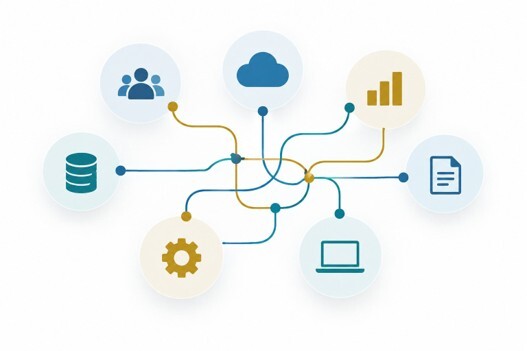
The challenge with point-to-point integrations comes as the ecosystem grows. Connect SAP Business One to a CRM, and you have one connection to manage. Add eCommerce, a warehouse system, EDI, and a shipping platform, and each new application may need to exchange information with several others. What began as a few straightforward connections can turn into a web of dependencies.
That's when troubleshooting gets interesting (and not in a good way). A change in the CRM may affect data flowing to SAP Business One, which in turn affects information another system expects to receive. The symptom may show up in shipping even though the original problem started somewhere else.
A middleware platform can help by providing a more centralized way to manage communication among systems, but middleware isn't a cure for poor integration architecture. Adding another technology layer without clear standards, documentation, and ownership can simply give you a different version of the same problem.
The goal isn't to eliminate every direct connection. It's to understand when a simple connection is still serving the business and when the growing number of dependencies is creating risk that will become harder and more expensive to manage.
Should we avoid custom ERP scripts?
Not necessarily. Custom scripts can solve legitimate business needs, but they become risky when they're undocumented, unsupported, or dependent on one person to keep them running.
Most custom ERP scripts don't start out as technical debt. They start because someone needs to solve a problem. A developer builds a script. It does exactly what it's supposed to do, and everyone moves on.
The trouble starts when that script becomes part of a critical process without anyone planning for who will support it two or three years later.
Maybe the original developer leaves. Maybe the business process changes, but the documentation doesn't. Or maybe there wasn't much documentation to begin with. Eventually, something upstream changes and the script stops behaving as expected.
Sometimes it fails completely. Other times, it keeps running but stops doing one small part of its job correctly. Those are the failures I worry about more because they can go unnoticed until someone discovers that data hasn't been updating the way everyone assumed it was.
That's how a useful workaround can become ERP technical debt. The cost isn't just maintaining the code. It's the support hours spent figuring out what it does, the rework required when connected systems change, and the downtime or manual effort that follows when something breaks.
Whenever possible, supported APIs, documented extensions, and established integration methods give you a better foundation. Custom work still has a place. It just shouldn't become a permanent business dependency without a plan for maintaining it.
Why do ERP integrations break after upgrades?
ERP integrations often break after upgrades because the systems, APIs, data structures, authentication methods, or business logic they depend on have changed. The upgrade may trigger the failure, but the underlying weakness was often already there.
ERP upgrades are a normal part of ERP lifecycle management, and SAP Business One isn't the only application changing. Your CRM, eCommerce platform, warehouse system, shipping applications, and other connected technology all have their own release cycles. Any one of those changes can affect how information moves through the larger ecosystem.
APIs evolve, too. Fields can be added or changed, authentication methods can be updated, and older approaches may eventually be phased out. SAP, for example, maintains change logs for the SAP Business One Service Layer APIs, and OData v4 is now the preferred option for Service Layer. That kind of evolution is exactly why an integration can't be treated as something you build once and forget about.
Using supported API integrations and SAP Business One tools like the SAP Business One Service Layer and SAP Business One Integration Framework (B1if) can provide a more maintainable foundation. But the technology alone doesn't make an integration upgrade-safe. You still need to know what connects to what, understand the dependencies, and test those connections as part of the upgrade process.
That's the real goal of upgrade-safe integrations: not eliminating change, but making sure routine change doesn't turn into an unexpected business disruption.
Why governance and monitoring matter
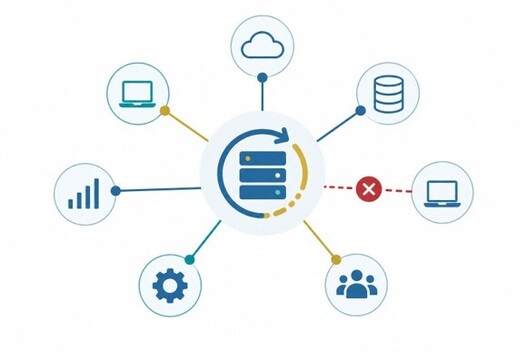
Integration governance establishes the rules for how information moves between systems, while integration monitoring helps make sure those rules continue to work as intended. You need both because an integration can keep running even when the information moving through it isn't complete, current, or correct.
Good integration governance starts with understanding where information originates, which systems can update it, and what should happen when there's an exception. That doesn't necessarily mean choosing one application to own an entire record.
Consider a business using both CRM and SAP Business One. A customer account might originate in the CRM and then flow to the ERP. From there, both systems may continue updating information as different teams work with that customer. Some fields might be updated in either system, while others, such as a specific address or financial field, may have clearly defined ownership.
The important thing is that those rules are deliberate. If two systems can update the same information, the integration needs to know how those changes are handled. If only one system can update a particular field, that rule needs to be understood and enforced. That's how data synchronization becomes a business process rather than simply data moving back and forth.
Then you need integration monitoring to know when something isn't working as expected. A connection that stops completely usually gets attention. A connection that keeps running while one field stops updating is much easier to miss.
That's why exception workflows matter. Someone needs to know when an integration fails, what information was affected, and who is responsible for resolving it. Otherwise, users often discover the problem first and create manual workarounds to keep the business moving. By then, a technical issue may already have become an operational one.
What does "upgrade-safe" integration mean?
Upgrade-safe integrations are built so routine changes to ERP and connected systems can be identified, tested, and managed without creating unnecessary business disruption. That doesn't mean an integration will never need attention when software changes.
Upgrade-safe is NOT the same as upgrade-proof.
In practice, upgrade-safe integrations share a few characteristics:
- Supported. They use supported APIs and integration methods rather than relying on workarounds that may stop functioning after an update.
- Documented. Someone other than the person who built the integration can understand how it works, what it connects, and where its dependencies are.
- Monitored. Failures and exceptions are surfaced quickly instead of waiting for a user to discover that something hasn't updated.
- Tested. Integrations are included in upgrade planning and regression testing, not checked only after the new version goes live.
- Governed. Ownership, data flows, and exception processes are clearly defined.
None of these practices eliminate change. They make change manageable.
When the integration architecture is understood and maintained throughout its lifecycle, an upgrade becomes something you can plan for rather than an event that sends everyone scrambling to figure out what broke.
How do we reduce ERP integration support costs?
ERP integration support costs come down when businesses spend less time reacting to failures and more time preventing them. Standardized architecture, documentation, monitoring, and clear ownership make problems easier to identify and resolve before they turn into expensive emergencies.
The cost of a fragile integration goes well beyond the hours IT spends troubleshooting it. When information stops flowing correctly, employees may need to rekey data, reconcile systems, track down missing transactions, or create temporary workarounds. An upgrade can require unexpected rework, and a failure in a critical process can lead to downtime that affects customers as well as employees.
Good integration monitoring helps catch problems earlier, while clear integration governance reduces the time spent figuring out who owns the issue and how it should be handled. Documentation also makes the business less dependent on the one person who happens to know how a particular connection works.
The goal isn't zero support cost. Integrations need ongoing care as systems and processes evolve. The goal is to replace emergency troubleshooting with predictable ERP lifecycle management, where maintenance and testing are part of the plan instead of unpleasant surprises.
How to prevent integration sprawl
Preventing integration sprawl starts with understanding the entire ecosystem before adding another connection to it. That could mean looking beyond whether two systems can communicate and considering how each connection fits into the larger integration architecture.
Ecosystem mapping helps identify the applications involved, how information moves among them, and where important dependencies already exist. From there, architecture standards can provide a consistent approach to new integrations instead of solving each connection as a separate technical project.
Sequencing matters, too. Connecting the right systems in the wrong order can create unnecessary rework or dependencies that become harder to unwind later.
The work doesn't end when an integration goes live. Monitoring and lifecycle planning help make sure connections continue supporting the business as applications, processes, and data flows change.
The objective is a connected environment that's easier to understand, maintain, and adapt without letting every new business need add another layer of integration risk.

Don't wait for an integration to fail
The real test of an integration isn't whether it works on launch day. It's whether it can keep working as the systems and business around it change.
If you're not sure where the weak points are in your current environment, an Integration Risk Assessment can help identify fragile connections before they become operational problems.
In the next article, I'll look at how to prioritize connections and build them in an order that supports long-term stability.