
Why This Topic Matters
Financial reporting is at the heart of nearly every Business Central implementation. Controllers, CFOs, and finance teams rely on accurate, timely reports to make decisions, manage compliance, and communicate performance. That makes Business Central Financial Reporting an important part of the day-to-day work of many finance teams.
In Business Central 2026 Release Wave 1 (BC28), Microsoft significantly enhances financial reporting with a focus on governance, usability, automation, and presentation. These updates reduce manual effort, improve consistency, and give organizations greater control over how reports are created and distributed.
The result is a more structured and professional reporting experience, especially valuable during month-end close and executive reporting cycles.
What is new in Business Central BC28 financial reporting?
BC28 introduces new Business Central financial reporting capabilities focused on governance, automation, and consistency. Organizations can now better control report creation, streamline distribution, and improve overall reporting quality.
Key features in Business Central financial reporting
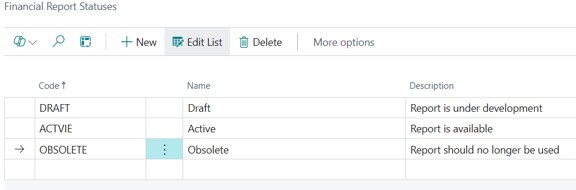
1. Financial report statuses and categories
New fields make it easier for organizations to categorize and manage reports more effectively.
Benefits:
- Easier report organization
- Improved usability
- Cleaner report libraries
2. Built-in branding and layout customization
Report authors can display company logos and override global report settings for individual Business Central financial reports.
Benefits:
- Professional, client-ready reports
- Reduced manual formatting
- Flexible customization with controlled standards
3. Automated distribution and PDF consolidation
Users can schedule reports for distribution groups and combine multiple reports into a single PDF output. This kind of Business Central report automation can reduce the repetitive work involved in month-end reporting.
Benefits:
- Saves time during month-end
- Simplifies report packaging
- Improves consistency for leadership reporting

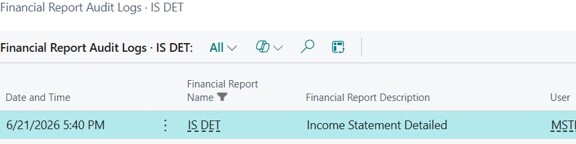
4. What is the financial reporting audit log in Business Central BC28?
The new Business Central financial reporting audit log allows administrators to track report usage and see who ran a report, when it was run, and its output format.
Benefits:
- Greater visibility into usage
- Helps identify redundant reports
- Supports compliance requirements

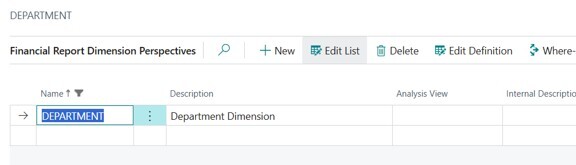
5. Run reports across all dimension values
Reports can now be run across all dimension values at once.
Benefits:
- Eliminates manual iteration
- Reduces errors
- Speeds up analysis
These enhancements don’t replace Excel or Power BI. Business Central is well suited to controlled, repeatable financial reporting, while Excel and Power BI continue to serve different analysis and reporting needs.
Wave 2, V29, released in October 2026, brings more benefits to finance teams
1. Trace G/L Account Usage in Financial Reports
Business Central BC29 introduces the ability to trace where general ledger (G/L) accounts are used in financial reports. This gives finance teams greater visibility into report configurations and helps them understand how account information contributes to financial reporting.
Benefits:
- Simplifies financial report maintenance
- Helps identify where G/L accounts are referenced
- Supports more accurate reporting configurations
- Makes troubleshooting and reviewing financial reports easier
Why it matters: Controllers and finance teams can spend less time investigating report structures and more time analyzing financial results.
2. Financial Report Changes Are Now Always Logged
Business Central BC29 strengthens financial reporting governance by making change logging mandatory for financial reports. This enhancement helps organizations maintain a more consistent record of changes to their financial reporting configurations.
Benefits:
• Improves visibility into financial reporting changes
• Strengthens accountability
• Supports internal controls and audit preparation
• Helps finance teams investigate reporting changes
Why it matters: For organizations with strict reporting requirements, consistent change tracking can improve confidence in the integrity of financial reports.
3. Bookmark List Views and Analysis Tabs
Business Central BC29 allows users to bookmark list views and analysis tabs, making it easier to return to frequently used data views.
Finance professionals can access the information they regularly review without repeatedly navigating to or recreating their preferred views.
Benefits:
• Faster access to frequently used analysis views
• Less repetitive navigation
• Improved productivity for finance teams
• Easier access to information used in recurring reporting activities
Why it matters: Finance teams regularly review the same financial data during month-end close, budgeting, and management reporting. Easier access to these views helps streamline everyday analysis.
The Microsoft Business Central Wave 2 v29 release notes can be found here: BC29 Wave 2 release notes.
What should finance teams do before using the new BC28 reporting features?
Before automating more of the reporting process, take some time to review what you already have. Establish approval workflows, define report naming standards, configure global defaults, and assign ownership of report lifecycle management to ensure effective governance.
It’s also a good opportunity to remove duplicate reports, validate dimensions, and define distribution groups. Standardizing the process first helps prevent existing reporting problems from simply being automated.
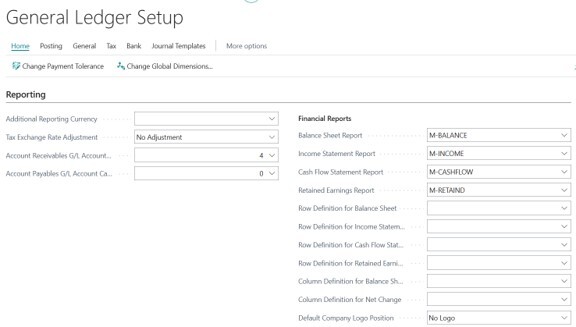
PDF consolidation in action
Finance teams can bundle multiple reports, such as Profit & Loss, Balance Sheet, and Cash Flow, into a single PDF for easier sharing and review.
Who benefits most
- CFOs and controllers: faster reporting and better governance
- Finance teams: reduced manual work and easier management
- Audit-focused organizations: stronger compliance controls
- Growing SMBs: scalable reporting processes
Final thoughts
Business Central 28 makes financial reporting easier to manage, automate, and control. These enhancements allow organizations to produce better reports with less effort and greater confidence.
If you’re looking at how these reporting improvements could fit into your own finance processes, Clients First can help you get more from Microsoft Dynamics 365 Business Central.